SYMPTOM:
A View added from a Teradata 14 instance to Strategy through Warehouse Catalog shows the NUMBER data type columns as Unknown as shown in the image below:

CAUSE:
This is a known issue in Strategy Warehouse Catalog 9.x - 10.x.
ACTION:
This issue has been addressed in Strategy version 10.7 and higher. If you are not already in this version, please upgrade to that version or the to the current Strategy release take advantage of that fix.
WORKAROUND:
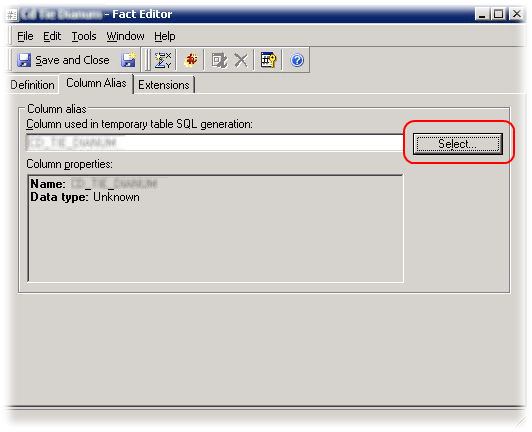
Set the column alias manually by editing the attribute or fact as shown:
1. Edit the fact, click on the Column Alias tab and click on the Select button:
2. In the Column Editor click on the New button:

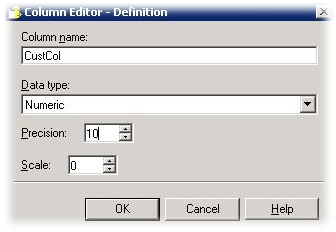
3. Set the Data type as Numeric, attribute 10 to Precision, 0 to Scale, click on OK to close the Column Editor - Definition, click on OK to close the Column Editor - Column Selection, click on the Save and Close button to close the Fact Editor and update the schema to validate this adjustment:
Third Party Software Installation Warning:
The third-party product(s) discussed in this technical note is manufactured by vendors independent of Strategy. Strategy makes no warranty, express, implied or otherwise, regarding this product, including its performance or reliability.
