EducationSoftwareStrategy.com
StrategyCommunity

Knowledge Base

Product

Community

Knowledge Base

TopicsBrowse ArticlesDeveloper Zone

Product

Download SoftwareProduct DocumentationSecurity Hub

Education

Tutorial VideosSolution GalleryEducation courses

Community

GuidelinesGrandmastersEvents
x_social-icon_white.svglinkedin_social-icon_white.svg
Strategy logoCommunity

© Strategy Inc. All Rights Reserved.

LegalTerms of UsePrivacy Policy
  1. Home
  2. Topics

KB47443: "Server Definition manipulations error: The connection failed." error appears when using a response file to create metadata tables and configure the Intelligence Server in a single execution of the Configuration Wizard in MicroStrategy 9.x


Community Admin

• Strategy


An error occurs when using a response.ini file to create metadata tables and configure the Intelligence Server in a single execution of the Configuration Wizard

SYMPTOM:
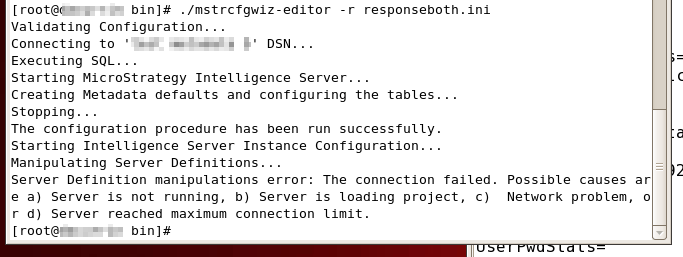
In Strategy 9.x, when using a response file to create metadata tables and configure the Intelligence Server in the same execution of Configuration Wizard in command-line mode (the response file has a [Repository] section and a [Server] section) on a newly-created DSN, the following error is encountered:
 

ka04W000000OdYzQAK_0EM4400000029Oo.png


Server Definition manipulations error: The connection failed. Possible causes are a) Server is not running, b) Server is loading project, c) Network problem, or d) Server reached maximum connection limit.

  
CAUSE:
This is a known issue in Strategy 9.x.  This issue has been resolved in Strategy 10.x.
 
ACTION:
Upgrade to Strategy 10.x to avoid the issue.
 
WORKAROUND:
Split the response file into two files, one for the [Repository] section and one for the [Server] section. Run them individually, and the configuration will complete successfully.


Comment

0 comments

Details

Knowledge Article

Published:

April 11, 2017

Last Updated:

April 11, 2017