EducationSoftwareStrategy.com
StrategyCommunity

Knowledge Base

Product

Community

Knowledge Base

TopicsBrowse ArticlesDeveloper Zone

Product

Download SoftwareProduct DocumentationSecurity Hub

Education

Tutorial VideosSolution GalleryEducation courses

Community

GuidelinesGrandmastersEvents
x_social-icon_white.svglinkedin_social-icon_white.svg
Strategy logoCommunity

© Strategy Inc. All Rights Reserved.

LegalTerms of UsePrivacy Policy
  1. Home
  2. Topics

KB47449: "[DataDirect][ODBC lib] Specified driver could not be loaded" error message appears when performing a Data Import from database in MicroStrategy Web 9.x or 10.x


Community Admin

• Strategy


When performing a Data Import from database in MicroStrategy Web, the following error message appears when selecting the database connection.

SYMPTOM:
 
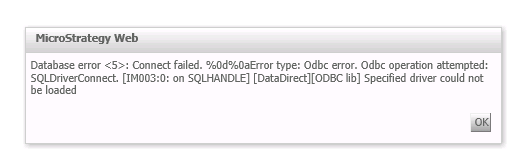
When performing a Data Import from database in Strategy Web 9.x or 10.x, the following error message appears when selecting the database connection.
ka04W000000Oh6uQAC_0EM440000002JBq.png


Database error <5>: Connect failed. %0d%0aError type: Odbc error. Odbc operation attempted" SQLDriverConnect. Specified driver could not be loaded 

 
CAUSE:
 
When a database connection is selected for data import, a new database instance using the selected database connection is created and stored in the metadata. One possible cause for the error is that the database connection configuration is not passed along to the database instance.
 
ACTION:
 
In Strategy Developer, modify the database instance to use the database connection that connects to the desired database for data import.


Comment

0 comments

Details

Knowledge Article

Published:

June 2, 2017

Last Updated:

June 2, 2017