EducationSoftwareStrategy.com
StrategyCommunity

Knowledge Base

Product

Community

Knowledge Base

TopicsBrowse ArticlesDeveloper Zone

Product

Download SoftwareProduct DocumentationSecurity Hub

Education

Tutorial VideosSolution GalleryEducation courses

Community

GuidelinesGrandmastersEvents
x_social-icon_white.svglinkedin_social-icon_white.svg
Strategy logoCommunity

© Strategy Inc. All Rights Reserved.

LegalTerms of UsePrivacy Policy
  1. Home
  2. Topics

KB47470: The out-of-the-box "All the Time" schedule displays an incorrect start time when the start date is the same as the current date in MicroStrategy Developer 9.4.x


Stefan Zepeda

Salesforce Solutions Architect • Strategy


The out-of-the-box "All the Time" schedule displays an incorrect start time when the start date is the same as the current date in MicroStrategy Developer 9.4.x

SYMPTOM:
 
The following issue is encountered when editing the "All the Time" schedule in Strategy Developer 9.4.x. In this example, the current date was 6/13/14.

  • In Strategy Developer, edit the out-of-the-box schedule named "All the Time" and click "Next".
     
ka02R000000kbnkQAA_0EM440000002CKy.png
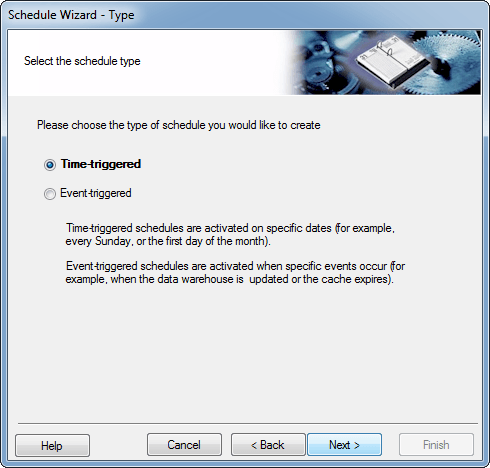
  • In the "Type" window, select "Time-triggered" and click "Next".
     
ka02R000000kbnkQAA_0EM440000002CLA.png
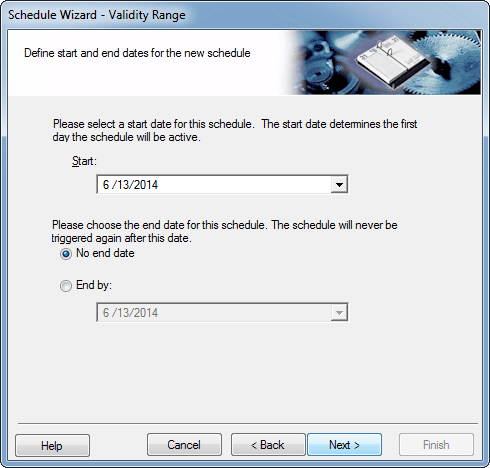
  • Set the "Start" date to today's date, select the "No end date" option and click "Next".
     
ka02R000000kbnkQAA_0EM440000002CL9.png
  • Set the "Recurrence pattern" and "Time to trigger" settings as shown below and click "Next".
     
ka02R000000kbnkQAA_0EM440000002CKz.png
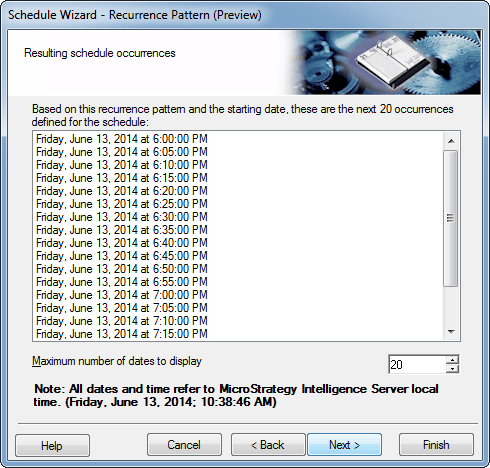
  • In the "Recurrence Pattern (Preview)" window, the user should expect to see the first occurence at 11:05 AM, (assuming the current time is 10:38:46 AM) and the start time of the schedule is 11:00:01 AM. However, the first occurence shows as 6:00:00 PM as shown below.
     
ka02R000000kbnkQAA_0EM440000002CL7.png

CAUSE:
 
This is a known issue in Strategy 9.4.x.
 
ACTION:
 
Contact Strategy Technical Support for an update on this issue.
 
WORKAROUND:
 
Users can create a new schedule via the Schedule Wizard with the same settings as the out-of-the-box "All the Time" schedule.


Comment

0 comments

Details

Knowledge Article

Published:

June 8, 2017

Last Updated:

June 8, 2017