SYMPTOM:
When importing a list of ZIP codes from countries other than the US, the attribute forms Latitude and Longitude cannot be displayed in a report nor document.
CAUSE:
The entries for the ZIP codes being imported are missing in ZipCode.csv file stored in the Intelligence Server folder
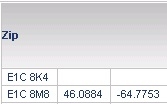
In this case, only E1C 8M8 has been added to the ZipCode.csv file so it is only possible to see the longitude and latitude for that ZIP code.
ACTION:
1) Go to the Intelligence Server folder.
2) Look for ZipCode.csv file under <Strategy Installation Path?\Intelligence Server\ZipCode.csv
3) Add the information for all the ZIP codes that are being imported.
NOTE: If any of the information is collected from external sources, please be sure to cite the source (i.e., give the author and his or her company appropriate credit). Technical notes should provide all the necessary information for solving an issue. Links to other technical notes or web pages should only provide additional information for further user reference.
WARNING MESSAGES: Only insert the appropriate one(s) if necessary
