EducationSoftwareStrategy.com
StrategyCommunity

Knowledge Base

Product

Community

Knowledge Base

TopicsBrowse ArticlesDeveloper Zone

Product

Download SoftwareProduct DocumentationSecurity Hub

Education

Tutorial VideosSolution GalleryEducation courses

Community

GuidelinesGrandmastersEvents
x_social-icon_white.svglinkedin_social-icon_white.svg
Strategy logoCommunity

© Strategy Inc. All Rights Reserved.

LegalTerms of UsePrivacy Policy
  1. Home
  2. Topics

KB47505: "The connection failed..." error message is encountered when connecting from Developer to an Intelligence Server running on UNIX/Linux when the IPTables firewall is enabled on the Intelligence Server machine in MicroStrategy 9.4.x - 10.x


Stefan Zepeda

Salesforce Solutions Architect • Strategy


This technical note outlines an issue that prevents Developer from connecting to a Unix Intelligence Server.

SYMPTOM:
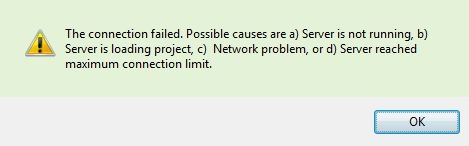
The following error message is encountered when connecting from Developer to an Intelligence Server running on UNIX/Linux when the IPTables firewall is enabled on the Intelligence Server machine in Strategy 9.x - 10.x.
 

ka02R000000kc3NQAQ_0EM440000002CIx.jpeg


The connection failed. Possible causes are a) Server is not running, b) Server is loading project, c) Network problem, or d) Server reached maximum connection limit
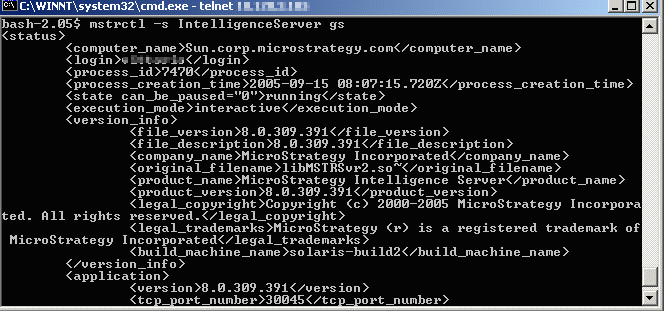
 
 
When the error is encountered, the Intelligence Server state is "running" (which can be verified by using the ‘mstrctl –s IntelligenceServer gs’  command from the <Strategy HOME>/bin directory using command prompt/terminal, as shown below).
 

ka02R000000kc3NQAQ_0EM440000002CIz.png


CAUSE:
One possible cause for this issue is the IPTables firewall being enabled on the Intelligence Server machine which blocks any network packets that cross the networking interface between the Intellignece Server and the client machine.
 
ACTION:
Users should check with the Network Administrator to make sure that the IPTables Firewall is configured properly so that the communication between the Intelligence Server and client machine is not blocked. Disabling it should resolve the issue.


Comment

0 comments

Details

Knowledge Article

Published:

May 31, 2017

Last Updated:

May 31, 2017