EducationSoftwareStrategy.com
StrategyCommunity

Knowledge Base

Product

Community

Knowledge Base

TopicsBrowse ArticlesDeveloper Zone

Product

Download SoftwareProduct DocumentationSecurity Hub

Education

Tutorial VideosSolution GalleryEducation courses

Community

GuidelinesGrandmastersEvents
x_social-icon_white.svglinkedin_social-icon_white.svg
Strategy logoCommunity

© Strategy Inc. All Rights Reserved.

LegalTerms of UsePrivacy Policy
  1. Home
  2. Topics

KB47546: "Inbox message result is not ready" or empty error message appears when running script "ALTER HISTORYLIST SUBSCRIPTION" in Command Manager


Community Admin

• Strategy


Error message appears when running script "ALTER HISTORYLIST SUBSCRIPTION" in Command Manager

SYMPTOM:
 
"Inbox message result is not ready" or empty error message appears when running script "ALTER HISTORYLIST SUBSCRIPTION" in Command Manager
 
The following steps demonstrate how to reproduce the issue in Strategy Tutorial project:
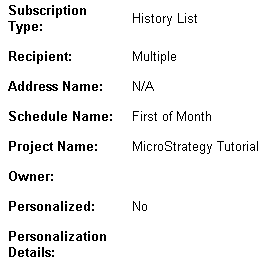
    1. Create one report without any prompt. Create a document with this report as dataset.
    2. Create History List subscription S1 on this document. Create History List subscription S2 on this dataset.
    3. Modify the dataset and add one prompt.
    4. Right click on the subscriptions above and choose "Quick view". Both S1 and S2 have no personalization as shown below:


ka04W000000ObegQAC_0EM4400000029N3.gif


    1. Run script for S1 in Command Manager with error as shown below:


ka04W000000ObegQAC_0EM4400000029N0.gif


ALTER HISTORYLISTSUBSCRIPTION "S1"  OWNER "Developer" IN PROJECT "Strategy Tutorial" ;


Syntax is correct.
(Inbox MESSAGE result is not ready.).
Task(s) EXECUTION completed WITH errors.
EXECUTION TIME: 00:00:00 


    1. Run similar script for S2 with empty error as shown below:


ka04W000000ObegQAC_0EM4400000029N1.gif


ALTER HISTORYLISTSUBSCRIPTION "S2"  OWNER "Developer"    IN PROJECT "Strategy Tutorial" ; 


Syntax is correct.
().
Task(s) EXECUTION completed WITH errors.
EXECUTION TIME: 00:00:00 
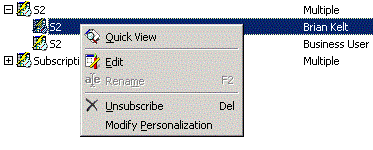
CAUSE:
 
Subscription has no personalization while it is supposed to have since the document/report contains prompt.
 
ACTION:
 
Expand subscription and click on "Modify Personalization" to manually set personalization for each recipient as shown below:
 

ka04W000000ObegQAC_0EM4400000029My.gif


Comment

0 comments

Details

Knowledge Article

Published:

May 18, 2017

Last Updated:

May 18, 2017