Device Protection Code (DPC) for Strategy Mobile for iOS.
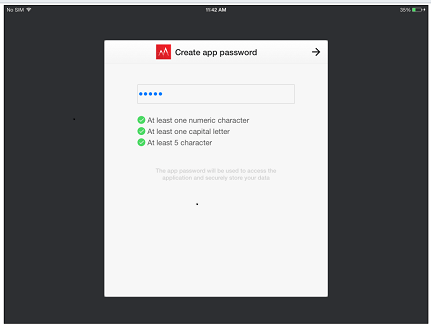
The Device Protection Code (DPC) is a feature designed to prevent unauthorized access to the Strategy Mobile application. This feature has been available on Andriod since 9.2.1a and has been ported to iOS to enhance the security on Apple's platform. With DPC, all the data stores on the device will be encrypted and that will provide an extra security layer on top of the already existing OS security. In order to enable the DPC feature, the administrator should turn it on from the Mobile Configuration Editor.
How to enable DPC for an iPad configuration:
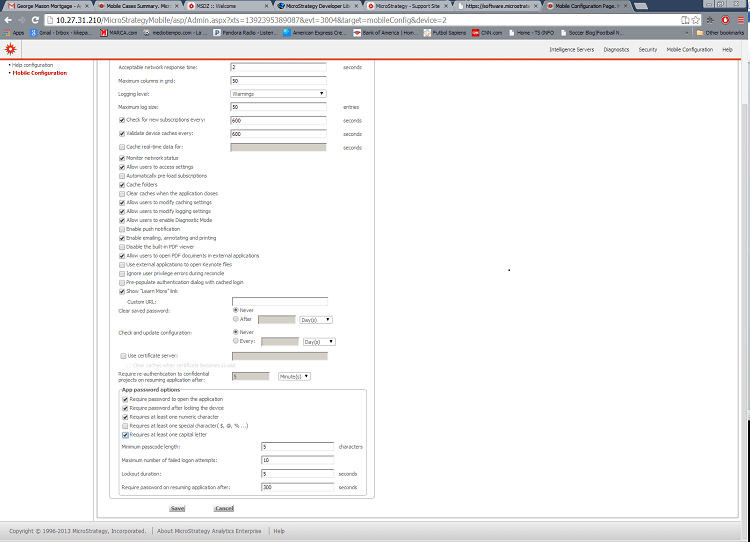
1. Access the Strategy Mobile Admin web page.
2. Define a new iPad configuration
3. Enable DPC by Selecting Require Password to Open the Application from the iPad Settings tab.
4. Enable the following settings:
a. Require password after locking the device
b. Requires at least one numeric character
c. Requires at least one capital letter
d. Minimum passcode length : 5
e. Maximum number of failed logon attempts: 10
f. Lockout duration: 5 s
g. Require password on resuming application after: 300 s
Complete the connectivity settings to point the app to your environment and apply the config URL to your iPad. Once the app is launched, it will prompt you for a new passcode: