EducationSoftwareStrategy.com
StrategyCommunity

Knowledge Base

Product

Community

Knowledge Base

TopicsBrowse ArticlesDeveloper Zone

Product

Download SoftwareProduct DocumentationSecurity Hub

Education

Tutorial VideosSolution GalleryEducation courses

Community

GuidelinesGrandmastersEvents
x_social-icon_white.svglinkedin_social-icon_white.svg
Strategy logoCommunity

© Strategy Inc. All Rights Reserved.

LegalTerms of UsePrivacy Policy
  1. Home
  2. Topics

KB47577: New Feature in MicroStrategy Mobile 9.4.1 Update 3 - Advanced Clustering Maps.


Community Admin

• Strategy


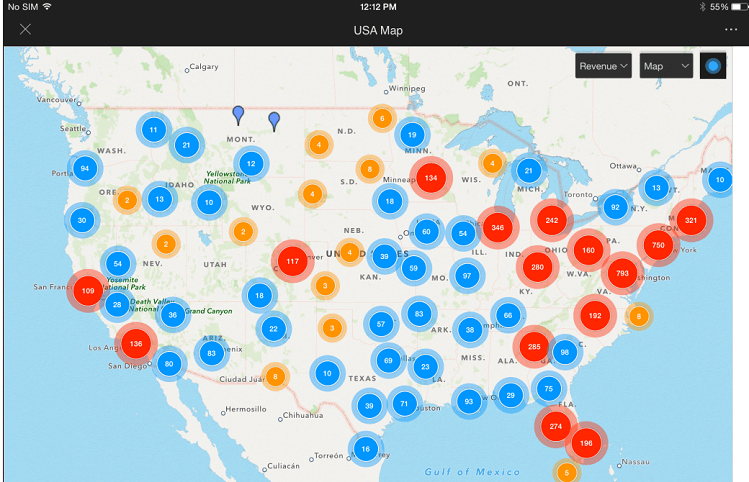
In the 9.4.1 Update 3 MicroStrategy Mobile app for iOS, maps will automatically group data points into clusters and will display a bubble that indicates the number of data points in the area. Clustering allows the map to adapt to the zoom level to make the information more consumable and improve the performance.
In the 9.4.1 Update 3 Strategy Mobile app for iOS, maps will automatically group data points into clusters and will display a bubble that indicates the number of data points in the area. Clustering allows the map to adapt to the zoom level to make the information more consumable and improve the performance.
Create an Advanced Clustering Map:

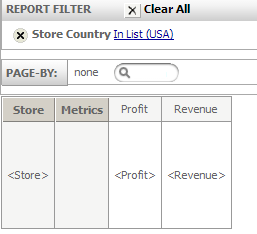
  • In Strategy Web 9.4.1, create a new report with the Store attribute (make sure you include the Latitude and Longitude attribute forms), and Profit and Revenue Metrics. Filter the data by Store Country = USA.
ka04W000000OdX3QAK_0EM440000002A4Y.png
  • Create a document using the report previously created as a dataset.
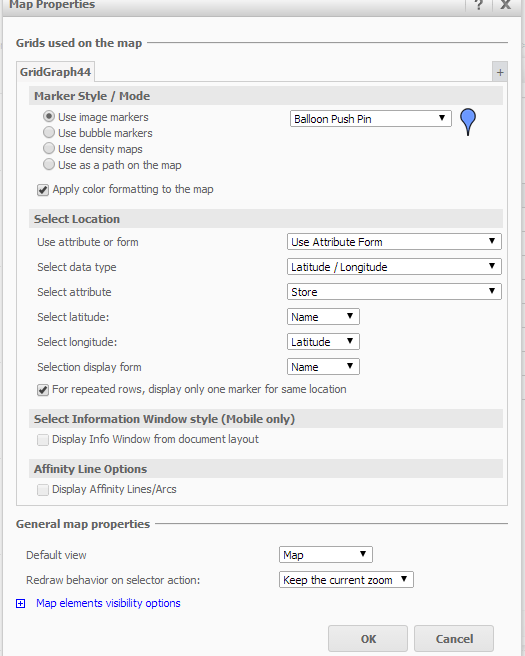
  • Add a Map widget and include all the data from the report. Make sure you add the Latitude and Longitude attribute elements.
  • Configure the Map widget so that it maps the latitude and longitude to the corresponding attribute forms:

ka04W000000OdX3QAK_0EM440000002A4K.png
  • Save the Document
  • Run the Document from an iPad. Currently, the document has 7,580 data points, but all of them will be grouped into smaller clusters.
  • As you zoom in and out, the map will automatically group or expand the data points.

ka04W000000OdX3QAK_0EM440000002A4X.png

Comment

0 comments

Details

Knowledge Article

Published:

April 7, 2017

Last Updated:

April 7, 2017