EducationSoftwareStrategy.com
StrategyCommunity

Knowledge Base

Product

Community

Knowledge Base

TopicsBrowse ArticlesDeveloper Zone

Product

Download SoftwareProduct DocumentationSecurity Hub

Education

Tutorial VideosSolution GalleryEducation courses

Community

GuidelinesGrandmastersEvents
x_social-icon_white.svglinkedin_social-icon_white.svg
Strategy logoCommunity

© Strategy Inc. All Rights Reserved.

LegalTerms of UsePrivacy Policy
  1. Home
  2. Topics

KB47589: "File not found. Make sure that the URL is valid and that the "Use Proxy" setting is checked if the URL is on a different domain..." appears when the MicroStrategy Tutorial "Commuter Analysis Dashboard" is executed in MicroStrategy Web 9.x


Community Admin

• Strategy


This technical note describes an error received from the RSS Widget after running the "Commuter Analysis Dashboard" in the MicroStrategy Web 9.x MicroStrategy Tutorial project. The reason the error is returned is because RSS Feed is no longer available from the URL configured in the widget. Follow the steps in this technical note to resolve the issue.

SYMPTOM:
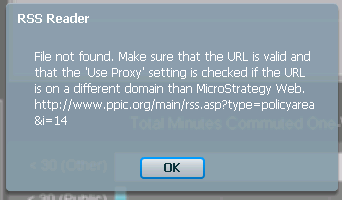
When the 'Commuter Analysis Dashboard' is Executed from Strategy Tutorial Project in Strategy Web, the RSS Widget returns the following error message:
 

ka04W000000ObOdQAK_0EM44000000264m.png


'File not found. Make sure that the URL is valid and that the 'Use Proxy' setting is checked if the URL is on a different domain than Strategy Web'. http://www.ppic.org/main/rss.asp?type=policyarea&i=14

CAUSE:
The reason the above error is returned is because RSS Feed is no longer available from the URL configured in the widget.
 
ACTION:
Follow the steps below in order to resolve the issue and obtain RSS feed in the widget:

  • Modify the resource.xml file to inlude:


    <allow-domains>
       <domain>www.ppic.org</domain>
    </allow-domains>

     
  • Restart the Web Appllication server.
  • Modify the widget properties to contain any of the following URLs:
    http://www.ppic.org/main/rss.asp?type=policyarea&i=4 
    http://www.ppic.org/main/rss.asp?type=policyarea&i=11 
    http://www.ppic.org/main/rss.asp?type=policyarea&i=17
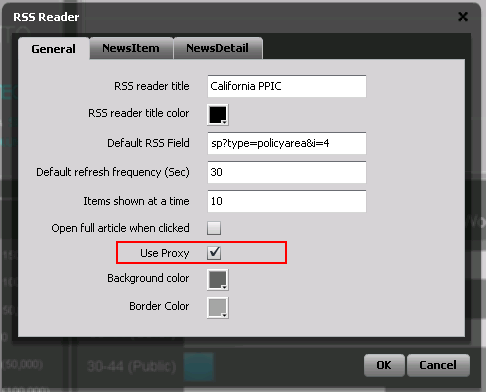
  • Enable Proxy in the widget properties:

ka04W000000ObOdQAK_0EM44000000264q.png
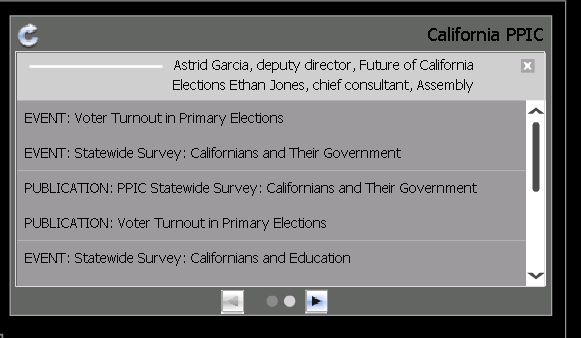
  • Now when the dashboard is executed in Strategy Web, the widget will retrieve the RSS Feed from www.pic.org, as shown on the image below:

ka04W000000ObOdQAK_0EM44000000264s.png

Comment

0 comments

Details

Knowledge Article

Published:

June 4, 2017

Last Updated:

June 4, 2017