EducationSoftwareStrategy.com
StrategyCommunity

Knowledge Base

Product

Community

Knowledge Base

TopicsBrowse ArticlesDeveloper Zone

Product

Download SoftwareProduct DocumentationSecurity Hub

Education

Tutorial VideosSolution GalleryEducation courses

Community

GuidelinesGrandmastersEvents
x_social-icon_white.svglinkedin_social-icon_white.svg
Strategy logoCommunity

© Strategy Inc. All Rights Reserved.

LegalTerms of UsePrivacy Policy
  1. Home
  2. Topics

KB47651: "Client found response content type of 'text/html;charset=UTF-8', but expected 'text/xml'" error returned when trying to connect to a Salesforce warehouse with MicroStrategy 9.x or 10.x


Community Admin

• Strategy


After configuring a DSN to Salesforce in MicroStrategy 9.x or 10.x, users may encounter an issue when connecting to the database.

SYMPTOM:
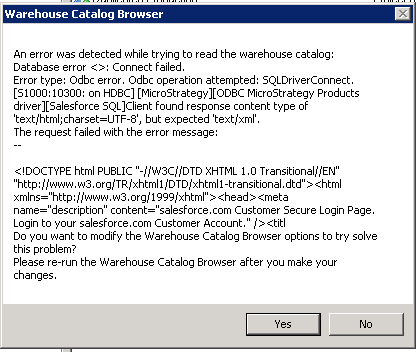
After configuring a DSN to Salesforce in Strategy  9.x or 10.x, users may encounter an issue when connecting to the database:
 

ka04W000000Oh8bQAC_0EM440000002JBl.png

Sample Code/Error


An error was detected while trying to read the warehouse catalog: Database error <>: Connect Failed. Error type: Odbc error. Odbc operation attempted: SQLDriverConnect. Client found response content type of 'text/html;charset=UTF-8', but expected 'text/xml'.

 
This particular error message was returned from Warehouse Catalog, however this can occur when connecting to the database by other means using the same DSN.
 
CAUSE:
A possible cause of the issue is that an incorrect site URL is used in the DSN to connect to Salesforce.
 
ACTION:
This issue has been resolved by changing the site URL in the DSN to the partner WSDL link:
 
https://test.salesforce.com/services/Soap/u/21.0


Comment

0 comments

Details

Knowledge Article

Published:

June 1, 2017

Last Updated:

June 1, 2017