EducationSoftwareStrategy.com
StrategyCommunity

Knowledge Base

Product

Community

Knowledge Base

TopicsBrowse ArticlesDeveloper Zone

Product

Download SoftwareProduct DocumentationSecurity Hub

Education

Tutorial VideosSolution GalleryEducation courses

Community

GuidelinesGrandmastersEvents
x_social-icon_white.svglinkedin_social-icon_white.svg
Strategy logoCommunity

© Strategy Inc. All Rights Reserved.

LegalTerms of UsePrivacy Policy
  1. Home
  2. Topics

KB47655: "The License key you are using to update the license contains the same licensing as what currently exists on the machine..." error is encountered when updating the license key with the same key in MicroStrategy 9.x


Community Admin

• Strategy


This technote details the behavior when the same license key is being applied to a MicroStrategy install that already uses this key.

SYMPTOM:
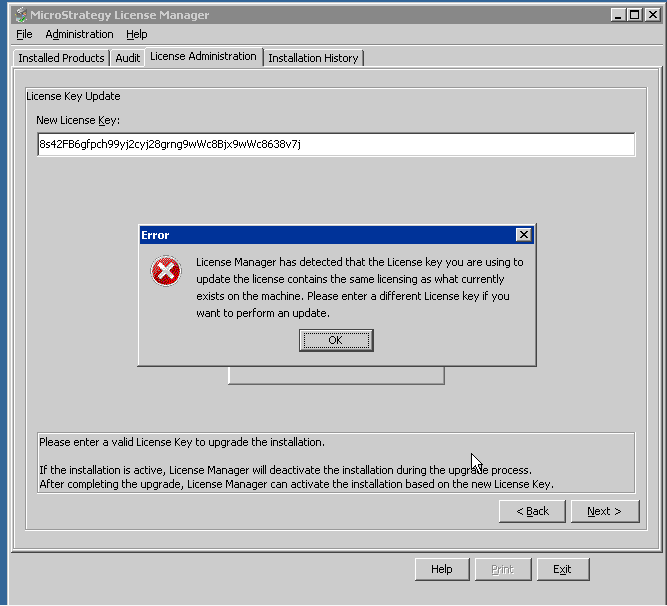
In License Manager, when updating the license key with the same exact license key in Strategy 10.x and 9.x, the following error is encountered.
ka04W000000OglwQAC_0EM4400000029NM.png


License Manager has detected that the License key you are using to update the license contains the same licensing as what currently exists on the machine. Please enter a different License key if you want to perform an update.

 
CAUSE:
This is working as expected. The license key being used to update the license cannot be the same exact license key that is currently in use on the machine on which Strategy is installed.


Comment

0 comments

Details

Knowledge Article

Published:

June 9, 2017

Last Updated:

June 9, 2017