EducationSoftwareStrategy.com
StrategyCommunity

Knowledge Base

Product

Community

Knowledge Base

TopicsBrowse ArticlesDeveloper Zone

Product

Download SoftwareProduct DocumentationSecurity Hub

Education

Tutorial VideosSolution GalleryEducation courses

Community

GuidelinesGrandmastersEvents
x_social-icon_white.svglinkedin_social-icon_white.svg
Strategy logoCommunity

© Strategy Inc. All Rights Reserved.

LegalTerms of UsePrivacy Policy
  1. Home
  2. Topics

KB47667: Unnecessary vertical and horizontal scroll bars appear in prompt page of Report Services document in MicroStrategy Web 9.x.


Community Admin

• Strategy


Unnecessary vertical and horizontal scroll bars appear in prompt page of Report Services document in MicroStrategy Web 9.x.

SYMPTOM:
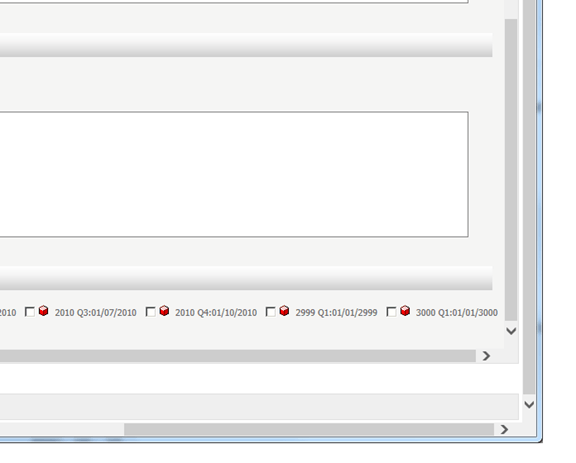
When both vertical and horizontal scrolls are rendered in prompt page of a Report Services document, unnecessary scrolls are displayed as seen below.
ka04W000000Oei7QAC_0EM44000000264l.png


CAUSE:
This is a known issue with Strategy Web 9.x.
 
ACTION:
Contact Strategy Technical Support for the latest status of this issue.
 
WORKAROUND:
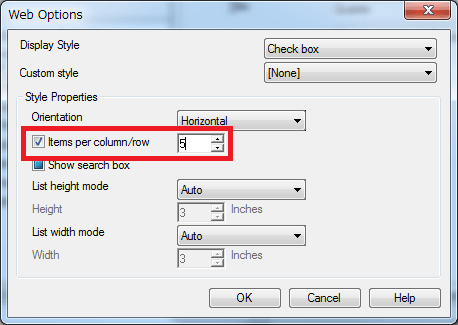
As this issue is seen only when both vertical and horizontal scrolls are rendered, define “Item per column/row” in the Web Options of a prompt to be displayed within a screen. 
ka04W000000Oei7QAC_0EM440000002654.png


Comment

0 comments

Details

Knowledge Article

Published:

June 7, 2017

Last Updated:

June 7, 2017