SYMPTOM:
When the maximum rows retrieved for a report are exceeded, an error similar to the following may be shown in Strategy Web:
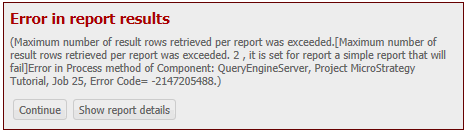
(Maximum number of result rows retrieved per report was exceeded.Error in Process method of Component: QueryEngineServer, Project Strategy Tutorial, Job 25, Error Code= -2147205488.)
However, when adding this report to a document after applying this customization, the document does not show the custom error message when executed:
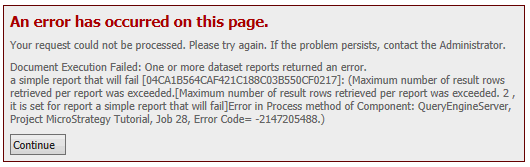
Error
Your request could not be processed. Please try again. If the problem persists, contact the Administrator.
Document Execution Failed: One or more dataset reports returned an error ...]: (Maximum number of result rows retrieved per report was exceeded.Error in Process method of Component: QueryEngineServer, Project Strategy Tutorial, Job 28, Error Code= -2147205488.)
CAUSE:
This is a limitation in how errors are handled in Strategy Web 9.4.x. If a dataset used by a document returns an error, the document will show the reason the dataset failed instead of the reason the document failed. There is an existing enhancement request for customized error messages coming from the dataset to be used when executed through a document.
ACTION:
Contact Technical Support for an update on this enhancement request.
WORKAROUND:
When a document fails to execute because one of the required datasets returned an error the error code returned for the document is "-2147466604".
This error code corresponds to the error: "DocumentDataPreparationTask: not all dataset reports are complete". Follow TN 32882 with this error code to customize this error for documents.
Note: This error applies to several errors caused by the dataset reports used in a document, including but not limited to a cube not being published, and the maximum row count being exceeded. This needs to be considered when customizing the message for this error.
CUSTOMIZATION WARNING
This customization is provided as a convenience to Strategy users and is only directly applicable to the version stated. While this code may apply to other releases directly, Strategy Technical Support makes no guarantees that the code provided will apply to any future or previous builds. In the event of a code change in future builds, Strategy Technical Support makes no guarantee that an updated version of this particular customization will be provided. In the event of a code change in future builds, Strategy may not be able to provide additional code on this matter even though this customization is provided at this time for this specific build. For enhancements to this customization or to incorporate similar functionality into other versions, contact your Account Executive to inquire about Strategy consulting assistance.
