EducationSoftwareStrategy.com
StrategyCommunity

Knowledge Base

Product

Community

Knowledge Base

TopicsBrowse ArticlesDeveloper Zone

Product

Download SoftwareProduct DocumentationSecurity Hub

Education

Tutorial VideosSolution GalleryEducation courses

Community

GuidelinesGrandmastersEvents
x_social-icon_white.svglinkedin_social-icon_white.svg
Strategy logoCommunity

© Strategy Inc. All Rights Reserved.

LegalTerms of UsePrivacy Policy
  1. Home
  2. Topics

KB47676: State abbreviations do not display areas on an Image Layout widget in MicroStrategy Mobile 9.4.1


Community Admin

• Strategy


KB47676: State abbreviations do not display areas on an Image Layout widget in MicroStrategy Mobile 9.4.1

SYMPTOM:
 
Using the Data Import feature for mapping Geo-Roles, a user can create a cube with the states of the United States, to be used with the Image Layout widget. The state names can be the full state name or the state abbreviations and the widget will automatically adjust to work with both, in Strategy Web 9.4.1; the tooltips display the correct state name or abbreviation and their respective metric values. However, in Strategy Mobile 9.4.1, the state abbreviations are not recognized; the map will not display any colors, and the tooltips will display the full state name for all states regardless of there being data for that state or not, like shown below.
 
View in Strategy Mobile 9.4.1:


ka04W000000Oh7nQAC_0EM440000002A4H.png

 
View in Strategy Web 9.4.1:
 

ka04W000000Oh7nQAC_0EM440000002A4J.png

 
STEPS TO REPRODUCE:

  • Create an Excel file with state abbreviations and a metric, like shown below.
ka04W000000Oh7nQAC_0EM440000002A4W.png
  • Import the file and map the State attribute to the State geo role, as shown below.
ka04W000000Oh7nQAC_0EM440000002A4N.png
  • Create a Document from the data.
  • Insert Widget > Mobile > Image Layout.
  • Open the widget properties.
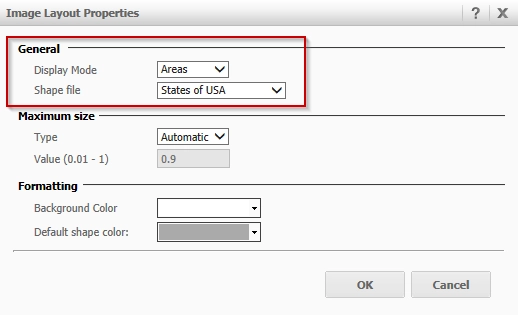
  • Set the Display Mode to 'Areas' and Shape file to 'States of USA', like shown below.
ka04W000000Oh7nQAC_0EM440000002A4L.png
  • Run the document from the Strategy Mobile 9.4.1 app.

CAUSE:
 
This is a limitation in Strategy Mobile 9.4.1, where the state abbreviations are not yet automatically recognized. A request has been logged to address this.
 
ACTION:
 
Contact Strategy Technical Support for an update on this issue.
 
WORKAROUND:
 
Use an attribute with full State names to display areas on an Image Layout in Strategy Mobile 9.4.1.


Comment

0 comments

Details

Knowledge Article

Published:

June 1, 2017

Last Updated:

June 1, 2017