EducationSoftwareStrategy.com
StrategyCommunity

Knowledge Base

Product

Community

Knowledge Base

TopicsBrowse ArticlesDeveloper Zone

Product

Download SoftwareProduct DocumentationSecurity Hub

Education

Tutorial VideosSolution GalleryEducation courses

Community

GuidelinesGrandmastersEvents
x_social-icon_white.svglinkedin_social-icon_white.svg
Strategy logoCommunity

© Strategy Inc. All Rights Reserved.

LegalTerms of UsePrivacy Policy
  1. Home
  2. Topics

KB47684: Advanced Clustering on a map widget can not be disabled by default in MicroStrategy Mobile 9.4.1 iOS Update 3


Community Admin

• Strategy


A known limitation that MicroStrategy Mobile 9.4.1 iOS Update 3 doesn't have the option to disable the Advanced Clustering feature by default.

SYMPTOM:
 
In Strategy Mobile 9.4.1 update 3, advanced clustering for map widgets was introduced. Advanced clustering plots information on top of the native Apple maps, like shown below.
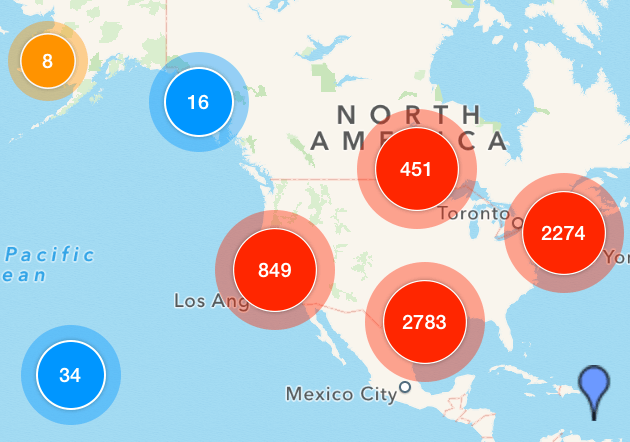


ka04W000001MKoYQAW_0EM440000002A3o.png

 
However, this feature is only available through the Strategy Mobile 9.4.1 iOS update 3 app and cannot be disabled by default. Currently, the only method of disabling advanced clustering is through the map widget settings once the document has executed, like shown below.
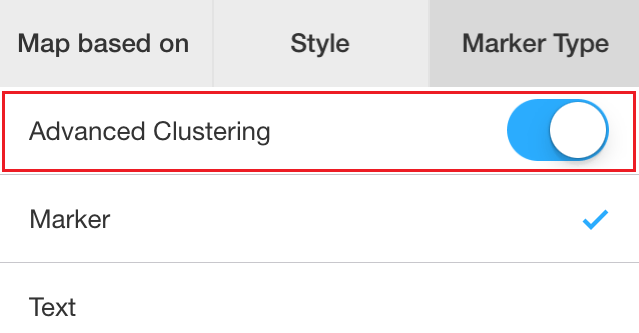
 

ka04W000001MKoYQAW_0EM440000002A3m.png

 
Disabling advanced clustering from the map widget properties cannot be saved either. Once the document is closed and re-opened, advanced clustering will be re-enabled.
 
Note: For information about  the Advanced Clustering feature, refer to technical note KB47577.
 
STEPS TO REPRODUCE:
 
In Strategy Tutorial:
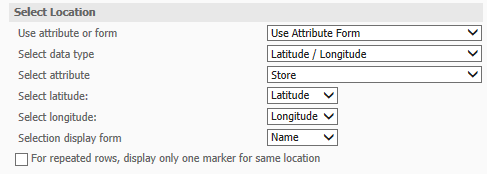
  •  Create a report with Store and Profit.
  • Enable Latitude and Longitude attribute forms on the Store attribute.
  • Save the report.
  • Create an iPhone Portrait document using the report as a dataset.
  • Insert widget > mobile > map.
  • Unmerge grid headers.
  • In the widget properties, check Show Markers.
  • Use attribute form for the Store attribute, like shown below.
ka04W000001MKoYQAW_0EM440000002A3l.png
  • Save the document.
  • Run the document in Strategy Mobile 9.4.1 iOS update 3
  • Notice the markers are clustered into large numbered bubbles, like shown below.
ka04W000001MKoYQAW_0EM440000002A3d.png
  • To disable, click on settings > marker style > advanced clustering.
  • Notice the markers display individually, like shown below.
ka04W000001MKoYQAW_0EM440000002A3q.png

CAUSE:
 
This is a limitation in Strategy Mobile 9.4.1 iOS update 3, currently there are no features that will achieve disabling advanced clustering by default. However, a request has been logged to address this issue.
  
ACTION:
 
Contact Strategy Technical Support for an update on this issue.


Comment

0 comments

Details

Knowledge Article

Published:

April 6, 2017

Last Updated:

April 6, 2017