EducationSoftwareStrategy.com
StrategyCommunity

Knowledge Base

Product

Community

Knowledge Base

TopicsBrowse ArticlesDeveloper Zone

Product

Download SoftwareProduct DocumentationSecurity Hub

Education

Tutorial VideosSolution GalleryEducation courses

Community

GuidelinesGrandmastersEvents
x_social-icon_white.svglinkedin_social-icon_white.svg
Strategy logoCommunity

© Strategy Inc. All Rights Reserved.

LegalTerms of UsePrivacy Policy
  1. Home
  2. Topics

KB47688: How to change the default "Path to MicroStrategy Office Installation" URL in MicroStrategy Web


Community Admin

• Strategy


How to change the default "Path to MicroStrategy Office Installation" URL in MicroStrategy Web

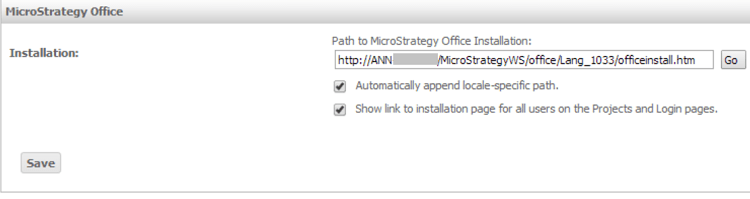
In Strategy Web 9.x, on Web Administrator page, it is possible to specify the Path to Strategy Office Installation, as shown below:
 

ka04W000000OhCQQA0_0EM44000000264A.png

 
In certain situation, when user tries to clear this text box or set "Lang_xxxx/officeinstall.htm"(xxxx is corresponding language code when "Automatically append locale-specific path" check box is checked) as default value, after click save, a default web service URL is appended automatically.
 
This default URL is hard coded in below file, user is able to modify the "URL=" parameter to specify another default value or leave it blank in order to set "Path to Strategy Office Installation" to "Lang_xxxx/officeinstall.htm". Restart the Web Server for these changes to take effect.
 
<Strategy Web Path>\WEB-INF\classes\resources\office.properties 


Comment

0 comments

Details

Knowledge Article

Published:

May 31, 2017

Last Updated:

May 31, 2017