SYMPTOM
When attempting to install Strategy Office 9.4.1 plugin 64-bit on a machine with Microsoft Office 2013 64 bit installed the following error message is shown, indicating that no 64 bit version of Microsoft Office has been found:
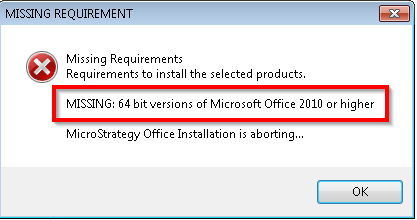
MISSING: 64 bit versions of Microsoft Office 2010 or higher.

CAUSE
The affected machine might have remaining registry keys from previous installations of Microsoft Office that prevent the Strategy Office requirements check to pass succesfully.
ACTION
1. Run regedit.exe
2. Make a backup of the registry. Highlight the root key "Computer" then select File > Export.
3. Check if the following registry exists:
HKEY_LOCAL_MACHINE\SOFTWARE\Microsoft\Office\14.0
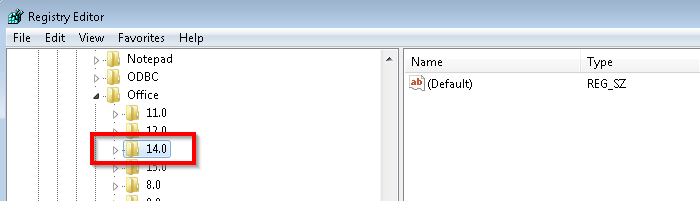
4. Delete the registry key and re-attempt installation.
Registry Modification:
WARNING:
Modifying registry values incorrectly may cause serious, system-wide problems that may require the re-installation of Microsoft Windows. Any edit of the registry is done at the user's own risk. Since these are user-initiated changes, they are not covered by any Strategy warranty. If using Microsoft Windows, the user should backup the registry and/or update an Emergency Repair Disk (ERD) prior to alterations.
