EducationSoftwareStrategy.com
StrategyCommunity

Knowledge Base

Product

Community

Knowledge Base

TopicsBrowse ArticlesDeveloper Zone

Product

Download SoftwareProduct DocumentationSecurity Hub

Education

Tutorial VideosSolution GalleryEducation courses

Community

GuidelinesGrandmastersEvents
x_social-icon_white.svglinkedin_social-icon_white.svg
Strategy logoCommunity

© Strategy Inc. All Rights Reserved.

LegalTerms of UsePrivacy Policy
  1. Home
  2. Topics

KB47715: In MicroStrategy Enterprise Manager 9.x, objects located within hidden folders do not appear as hidden in Enterprise Manager reports


Community Admin

• Strategy


In MicroStrategy Enterprise Manager 9.x, objects located within hidden folders don't appear as hidden in Enterprise Manager reports. This document explains that this is working as designed.

SYMPTOM
In Strategy Enterprise Manager 9.x, objects located within hidden folders don't appear as hidden in Enterprise Manager reports.
 
STEPS TO REPRODUCE
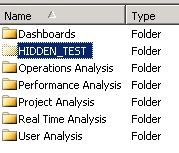
  • Create a report named TEST.
  • Place this report with a folder and mark the folder as hidden as shown below.

ka04W00000147nfQAA_0EM4400000029Ns.jpeg
  • After running a data load from Strategy Enterprise Manager 9.x, create a report in the Strategy Enterprise Manager project 9.x, with the attributes 'Report' and 'Object Hidden Status'. As seen in the screenshot below, the report is seen as 'VISIBLE'.

ka04W00000147nfQAA_0EM4400000029Nr.jpeg

 
CAUSE
This is working as designed. Strategy Enterprise Manager 9.x only reports on the hidden status of the actual object. In this case, the report itself is not hidden, but the parent folder is hidden, so the report shows the 'TEST' report object as visible.


Comment

0 comments

Details

Knowledge Article

Published:

March 31, 2017

Last Updated:

March 31, 2017
