EducationSoftwareStrategy.com
StrategyCommunity

Knowledge Base

Product

Community

Knowledge Base

TopicsBrowse ArticlesDeveloper Zone

Product

Download SoftwareProduct DocumentationSecurity Hub

Education

Tutorial VideosSolution GalleryEducation courses

Community

GuidelinesGrandmastersEvents
x_social-icon_white.svglinkedin_social-icon_white.svg
Strategy logoCommunity

© Strategy Inc. All Rights Reserved.

LegalTerms of UsePrivacy Policy
  1. Home
  2. Topics

KB47741: Two success notification emails delivered for one time based history list subscription that used to update intelligence cube in MicroStrategy 9.x clustered environment


Community Admin

• Strategy


Two success notification emails delivered for one time based history list subscription that used to update intelligence cube in MicroStrategy 9.x clustered environment

SYMPTOM:
In Strategy 9.x clustered environment, two success notification emails are delivered for one time based History List subscription that used to update intelligence cube. The delivery time is different as shown below:
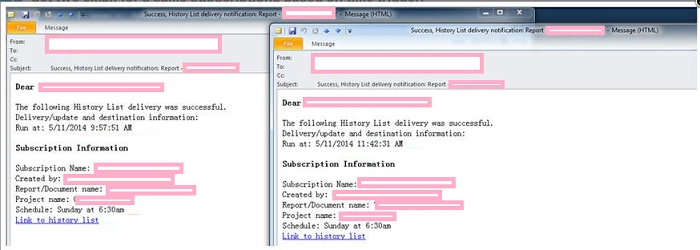
 

ka04W000000OfM2QAK_0EM4400000029NP.png

 
The intelligence cube has only one subscription is right mouse click the cube to view the dependent subscription.
 
The second run of the subscription is triggered by history list failover as below entry can be found in DSSErrors.log:


CDSSServerMessage::InitAfterLoad(): Failover candidate: MsgID=XXX, LocalServer=XXX1 ExecutingNode=XXX2, RqstStatus=22, LastErrorCode=0x0

 
REPRODUCING STEPS IN TUTORIAL:
 

  1. On node A create time-based History List (HL) subscription A to refresh intelligence cube, and enable notification email. Make sure the cube is large enough can make the job long running.
  2. Create another subscription B and make it run. Run right before the subscription A's trigger time. Make sure the job is also long running.
  3.  When subscription B is still running, subscription A is also triggered by the time event. When subscription A is launched, it sends the job to Node B. Node B starts running the cube, and it sends a broadcast update to Node A in order to change the HL status to running status.
  4. The history list message was created on Node A
  5.  User logs out from node A
  6.  User logs into node A, go to history list folder; make sure it is still running. Seeing the history list message is still in running status on the first login, Node A  thinks it is a failover candidate.
  7. User gets two notification emails saying that Delivery was successful.

 
NOTE: This is not always reproducible. Set schedule to run every 15 minutes and login to opposing node right away when schedule is triggered are required  in order to catch the issue.  
  
CAUSE:
This is a known issue with Strategy 9.x
  
ACTION:
This issue has been fixed in Strategy 10.0 GA. Upgrade to this version to take advantage of the fix.


Comment

0 comments

Details

Knowledge Article

Published:

June 8, 2017

Last Updated:

June 8, 2017