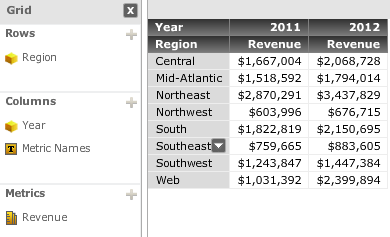
In order to calculate the difference for a metric Revenue between Year 2011 and 2012 in Strategy Visual Insight, MovingDifference function can be used to get the designed result.
MovingDifference
The function returns the moving difference between current and preceding values. The position of the preceding row used in the calculation is defined in the function arguments. The calculations can be restarted based on attributes set in the function parameters. This is an OLAP function.
Syntax
MovingDifference <BreakBy, SortBy> (Argument, WindowSize)
Where:
•BreakBy is the attribute indicating where the calculation restarts.
•SortBy is the attribute or metric by which the data is sorted.
•Argument is a metric representing a list of numbers.
•WindowSize is a positive integer indicating the range of values used to compute each difference.
REPRODUCING STEPS IN TUTORIAL:
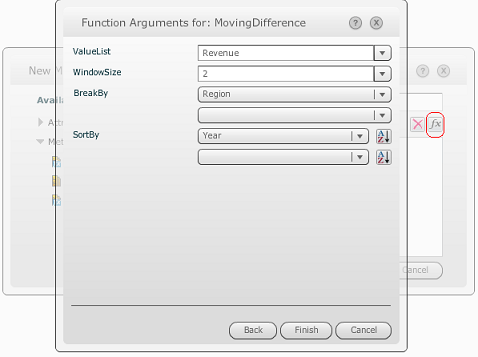
1. Create a new derived metric called MovingDifference with the formula below:
MovingDifference<BreakBy = {Country}, SortBy = (Year)>(Revenue,2)
It is recommended to build the derived metric using function wizard (the “fx” button in new metric editor) as show below:
2. Add it to the grid as shown below:
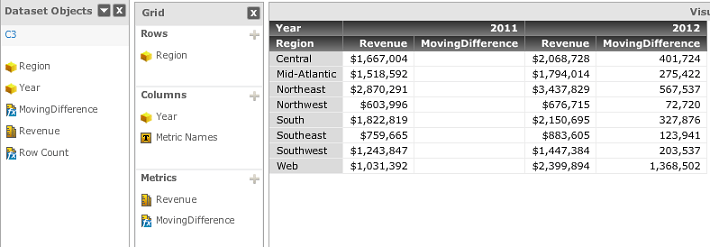
NOTE: All row attributes should be put into BreakBy, and Year into SortBy.
