EducationSoftwareStrategy.com
StrategyCommunity

Knowledge Base

Product

Community

Knowledge Base

TopicsBrowse ArticlesDeveloper Zone

Product

Download SoftwareProduct DocumentationSecurity Hub

Education

Tutorial VideosSolution GalleryEducation courses

Community

GuidelinesGrandmastersEvents
x_social-icon_white.svglinkedin_social-icon_white.svg
Strategy logoCommunity

© Strategy Inc. All Rights Reserved.

LegalTerms of UsePrivacy Policy
  1. Home
  2. Topics

KB47744: Text field height does not fit the content when a document is exported to Excel from MicroStrategy Web or executed in MicroStrategy Office 9.3.x and 9.4.x.


Community Admin

• Strategy


This technical note describes a known issue when exporting a document to Excel from MicroStrategy Web or exectuing a document in MicroStrategy Office 9.3.x and 9.4.x. This issue has been addressed in MicroStrategy Web and Office 10.x. Upgrade to this version to take advantage of this fix.

SYMPTOM:
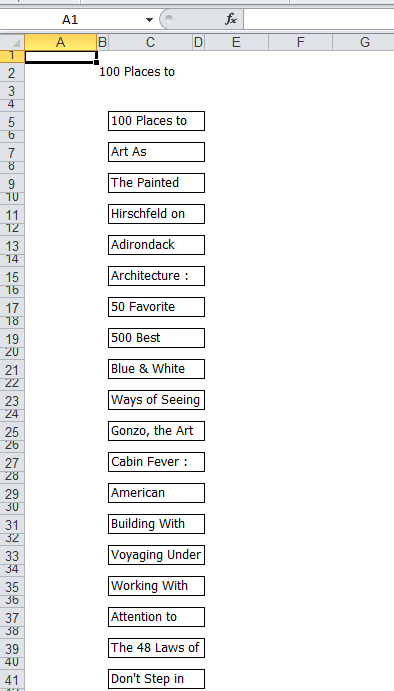
In Strategy Web 9.3.x and 9.4.x, when exporting a document to Excel, the height of the text fields is not adjusted to the content, causing the text to be truncated, even if "Automatically Fit Rows" properties is enabled at the section level.
The same issue happens when executing the document in Strategy Office 9.3.x and 9.4.x.
STEPS TO REPRODUCE:
  1. Create a report with Item attribute.
  2. Use the report as a dataset in a Report Services Document (use blank document template).
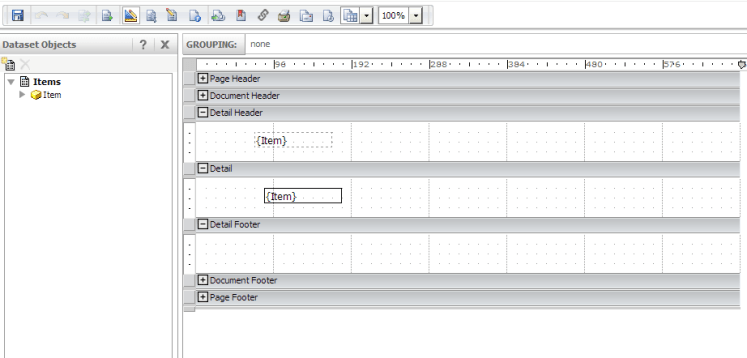
  3. Insert "Item" as a dynamic text field into both Detail Header and Detail section (choose black borders for the latter):
ka04W000000OedMQAS_0EM4400000025f5.png
  1. Right-click in the Detail section > Properties and Formatting > Layout > check "Automatically Fit Rows".
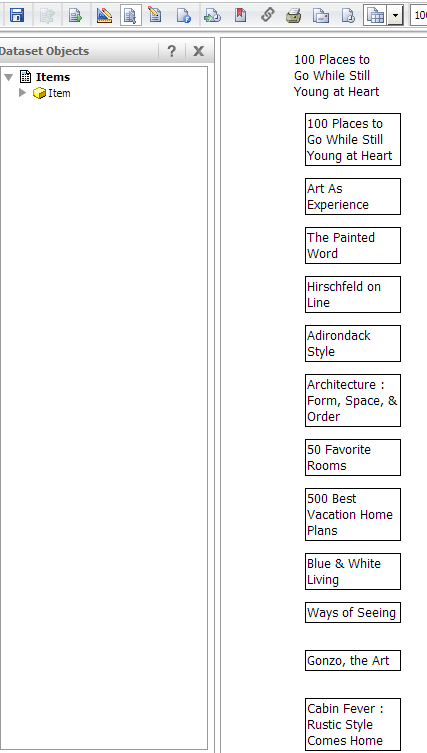
  2. This is how the document appears when executed in Interactive view mode:
ka04W000000OedMQAS_0EM4400000025fB.png
  1. This is how the document appears when exported to Excel:
ka04W000000OedMQAS_0EM4400000025f9.png

 
CAUSE:
This is a known issue with Strategy Web and Strategy Office 9.3.x and 9.4.x. 
ACTION:
This issue has been addressed in Strategy Web and Office 10.x. Upgrade to Strategy 10.x in order to benefit from the fix.


Comment

0 comments

Details

Knowledge Article

Published:

June 8, 2017

Last Updated:

June 8, 2017