EducationSoftwareStrategy.com
StrategyCommunity

Knowledge Base

Product

Community

Knowledge Base

TopicsBrowse ArticlesDeveloper Zone

Product

Download SoftwareProduct DocumentationSecurity Hub

Education

Tutorial VideosSolution GalleryEducation courses

Community

GuidelinesGrandmastersEvents
x_social-icon_white.svglinkedin_social-icon_white.svg
Strategy logoCommunity

© Strategy Inc. All Rights Reserved.

LegalTerms of UsePrivacy Policy
  1. Home
  2. Topics

KB47745: How to add or remove existing project Database Instances to the Database connections list in the Data Import window in MicroStrategy Web.


Community Admin

• Strategy


How to add or remove existing project Database Instances to the Database connections list in the Data Import window in MicroStrategy Web 2021.

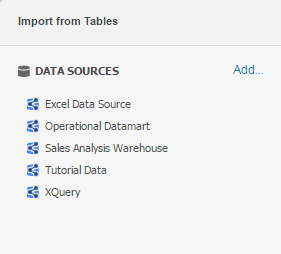
In Strategy Web, users are able to import unmodeled data directly from Database sources using the Data Import functionality. Some Database connections are populated by default as shown below:
ka0PW00000011lFYAQ_0EM440000002Kz4.png

The connections shown above are Database instances available for the current project. In some cases Strategy Web Administrators need to hide or show additional default connections for other Strategy Web users. This process is explained below.
To remove a default database connection:

  • Open Strategy Developer and connect to the Project Source as an administrator.
  • Load and right click the desired project and select Project Configuration.
  • Expand Database Instances and Select SQL or MDX Data warehouses depending on the connection that wants to be removed. 
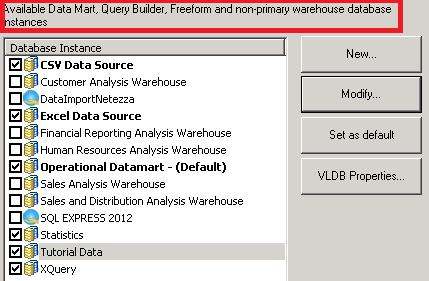
  • Check or uncheck the Database instances that want to be added/removed in the editor shown below:

ka0PW00000011lFYAQ_0EM44000000262f.png
  • No Intelligence Server restart is required. However, the Data Import Editor needs to be closed and opened again.

    Note: This process will remove the Database instance from the Database connections panel for all users in the current project.

Comment

0 comments

Details

Knowledge Article

Published:

May 3, 2017

Last Updated:

March 4, 2024