EducationSoftwareStrategy.com
StrategyCommunity

Knowledge Base

Product

Community

Knowledge Base

TopicsBrowse ArticlesDeveloper Zone

Product

Download SoftwareProduct DocumentationSecurity Hub

Education

Tutorial VideosSolution GalleryEducation courses

Community

GuidelinesGrandmastersEvents
x_social-icon_white.svglinkedin_social-icon_white.svg
Strategy logoCommunity

© Strategy Inc. All Rights Reserved.

LegalTerms of UsePrivacy Policy
  1. Home
  2. Topics

KB47752: Error "QueryEngine encountered error: Push Auto Commit failed.......Option: SQL_ATTR_AUTOCOMMIT.....Optional feature not implemented" is received when running a report against Cloudera Impala


Community Admin

• Strategy


The error is seen because Cloudera Impala 1.x or 2.x does not support transactions. However, as the option is attempted to be set, the error is received.

SYMPTOM
An error similar to the following is received when running a report against Cloudera Impala using the Strategy ODBC Driver for Impala Wire Protocol.


Error: SQL Generation Complete
QueryEngine encountered error: Push Auto Commit failed.
Error type: Odbc error. Odbc operation attempted: SQLSetConnectOption. Option: SQL_ATTR_AUTOCOMMIT. Optional feature not implemented. Connection String: DSN=BI - Big Data;UID=bi;HOST=impala.local;PORT=21050;DB=datawh;..
Error in Process method of Component: QueryEngineServer, Project Development, Job 2471, Error Code= -2147212544. 

This issue is seen in cases where the data is being inserted into the Impala warehouse from Strategy (datamart or multisource report)
 
 
CAUSE
The error is seen because Cloudera Impala 1.x or 2.x does not support transactions. However, as the option is attempted to be set, the error is received.
 
The option is attempted to be set because of the following 'Transaction Mode' option set on the DSN. When the setting to set to a value of 0, the data source and the driver do not support transactions. With the default setting of 0, since the driver/data source are set to not support transactions, and as there is no guarantee that the database does not support transactions just because the driver does not support it, we proceed to set the auto commit on the database and then receive an error.
 

ka04W000000ObeWQAS_0EM4400000029NN.jpeg


ACTION
For the Impala DSN, change the transaction mode to ignore. When the setting is on '1-Ignore', the data source does not support transactions and the driver always operates in auto-commit mode. Calls to set the driver to manual commit mode and to commit transactions are ignored. Since the errors are ignored, the report execution does not fail.
 
 
Windows
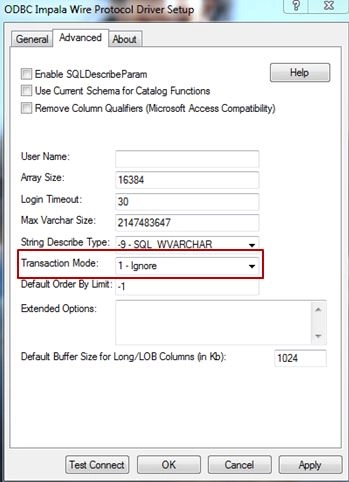
  • Open the 32-bit Windows ODBC Administrator and select the Impala DSN and choose to 'Configure' to edit it.
  • Go to the 'Advanced' tab and change the 'Transaction Mode' to '1 - Ignore' as shown below.
     
ka04W000000ObeWQAS_0EM4400000029NL.jpeg
  • Apply the changes and click on OK to save the changes.

 
Linux 

  1. Find the odbc.ini file in the home folder of the Strategy installation and edit it.
  2. Find the entry corresponding to the Impala warehouse DSN.  
  3. Within this DSN definition, find the entry 'TransactionMode=0' and change it to 'TransactionMode=1'
  4. Save and close the odbc.ini file.


Comment

0 comments

Details

Knowledge Article

Published:

May 18, 2017

Last Updated:

May 18, 2017