EducationSoftwareStrategy.com
StrategyCommunity

Knowledge Base

Product

Community

Knowledge Base

TopicsBrowse ArticlesDeveloper Zone

Product

Download SoftwareProduct DocumentationSecurity Hub

Education

Tutorial VideosSolution GalleryEducation courses

Community

GuidelinesGrandmastersEvents
x_social-icon_white.svglinkedin_social-icon_white.svg
Strategy logoCommunity

© Strategy Inc. All Rights Reserved.

LegalTerms of UsePrivacy Policy
  1. Home
  2. Topics

KB47757: In MicroStrategy Enterprise Manager 9.x, names of the objects in the MicroStrategy Enterprise Manager warehouse lookup tables are not modified after the object names are modified in the metadata


Community Admin

• Strategy


In MicroStrategy Enterprise Manager 9.x, names of the objects in the MicroStrategy Enterprise Manager warehouse lookup tables are not modified after the object names are modified in the metadata

SYMPTOM
After modifying an object's name in the Strategy 9.x metadata and running a data load from Strategy Enterprise Manager 9.x., users notice that the name of the object in not modified in the lookup table corresponding to that object in the Strategy Enterprise Manager warehouse. For example, if a report name is modified, the new name is not seen in the IS_REP_NAME column of the IS_REP lookup table. 
 
 
STEPS TO REPRODUCE
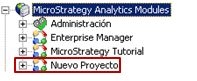
  • On Strategy Desktop/Developer 9.4.x, set the language preference to Spanish and create a new project as shown below.
     
ka04W000000OhL8QAK_0EM4400000029NR.jpeg
  • Create a new metric in the project (as a test object).
     
ka04W000000OhL8QAK_0EM4400000029NZ.jpeg
  • Note: This issue can be observed with any schema object, configuration object or application object and is not specific to a type of metadata object.
     
  • Perform a data load from Strategy Enterprise Manager 9.x and check the IS_MET (lookup table for metrics). The Spanish name is seen in the IS_MET_NAME column as shown below.
     
ka04W000000OhL8QAK_0EM4400000029NQ.jpeg
  • Now, change the default language of the metric to English and add the English translation as shown below.
     
ka04W000000OhL8QAK_0EM4400000029NS.jpeg
  • Changing the language for Strategy Desktop/Developer shows the English name of the object as shown below. 
ka04W000000OhL8QAK_0EM4400000029NO.jpeg
  • Now, change the name of the metric to 'New_Name_Test Metric' as shown below.
     
ka04W000000OhL8QAK_0EM4400000029NT.jpeg
  • Run a data load from Strategy Enterprise Manager 9.x and check the IS_MET table. The new name is not seen in the table and it still shows the Spanish name of the object.
     
ka04W000000OhL8QAK_0EM4400000029NV.jpeg
  •  
    The data load SQL also confirms that the object name is updated to the Spanish name. The object is updated because the modification time falls within the data load window.


    UPDATE IS_MET SET IS_PROJ_ID = 11, IS_MET_GUID = 'D64C17F64B0098AEDBC3C8B1A6FC645F', IS_MET_NAME = N'Nuevo(a) Indicador', IS_MET_DESC = N'', IS_MET_LOC = N'IS:\Nuevo Proyecto\Objetos públicos\Indicadores', EM_ACCESS_ID = N'255', EM_OWNER_ID = 1, EM_CREATE_DATE = '07/17/2014 07:19:01', EM_MODIF_DATE = '07/17/2014 09:23:35', IS_MET_ABBREV = N'', EM_HIDDEN_ID = 0, EM_EXISTS_ID = 1, EM_OWNER_NAME = N'Administrator', EM_HIDDEN_DESC = N'NOT HIDDEN', IS_MET_VER = N'A48F434F4BF7053C67A8EC88BA50C465', EM_EXISTS_DESC = N'EXISTS' WHERE IS_MET_GUID = 'D64C17F64B0098AEDBC3C8B1A6FC645F' AND IS_PROJ_ID = 11


  • Change the Spanish translation to 'New - Nuevo(a) Indicador' and run a data load again. This time, the object name gets modified in the IS_MET table as shown below.

ka04W000000OhL8QAK_0EM4400000029NX.jpeg


CAUSE
This behavior is as per design of Strategy Enterprise Manager 9.x. Strategy Enterprise Manager 9.x. is not designed to work with translations and will only contain the names corresponding to the language when the project was initially created and when the first data load was performed. Even if the default language of the project or objects is changed at a later time, this does not get updated in the Strategy Enterprise Manager 9.x warehouse. 
As seen in the example above, changes made to the objects names in the originally used default language get updated in the Strategy Enterprise Manager warehouse 9.x.
 
ACTION
There is no action to be taken as this is working as designed. An issue has been logged so to enhance Strategy Enterprise Manager to account for changes in the project or object's default language. 
Strategy will continue to investigate and post updates as soon as they are available.


Comment

0 comments

Details

Knowledge Article

Published:

May 25, 2017

Last Updated:

May 25, 2017