EducationSoftwareStrategy.com
StrategyCommunity

Knowledge Base

Product

Community

Knowledge Base

TopicsBrowse ArticlesDeveloper Zone

Product

Download SoftwareProduct DocumentationSecurity Hub

Education

Tutorial VideosSolution GalleryEducation courses

Community

GuidelinesGrandmastersEvents
x_social-icon_white.svglinkedin_social-icon_white.svg
Strategy logoCommunity

© Strategy Inc. All Rights Reserved.

LegalTerms of UsePrivacy Policy
  1. Home
  2. Topics

KB47764: How to check if MicroStrategy Web is connected to Intelligence Server using tasks on MicroStrategy Web 9.x


Community Admin

• Strategy


The article explains how to check if MicroStrategy Web is connected to Intelligence Server using tasks on MicroStrategy Web 9.x

Strategy administrators can access MicroStratey Web Administrator to check if Web server is currently connected to Strategy Intelligence server.
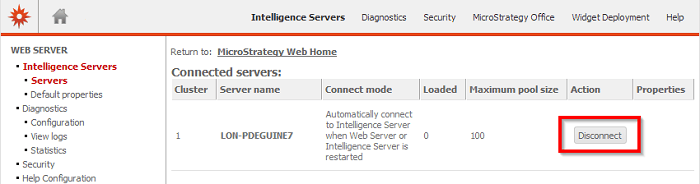


ka04W000000OhNqQAK_0EM440000002634.png

 
The same action, to check connectivity between a Strategy Web Server and a Strategy Intelligence Server can be performed via a task URL call against the taskProc servlet. 
 
The following URL is to check if the specified Intelligence Server is currently connected to Strategy Web Server:


http://<web server>:port/MicroStrategy/servlet/taskProc?
or
http://<web server>/MicroStrategy/asp/taskProc.aspx?

taskId=IsServerConnected
&taskEnv=xml
&taskContentType=xml
&server=
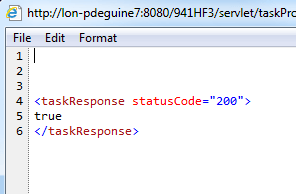
 
The required parameters are the following:
- taskId = IsServerConnected
- server = Intelligence Server machine name or IP address
- taskEnv / ContentType = In this case, the response set to XML, which returns an XML status of true or false:
 

ka04W000000OhNqQAK_0EM440000002636.png


<?xml version="1.0"?>
<taskResponse statusCode="200"> true </taskResponse>


Comment

0 comments

Details

Knowledge Article

Published:

May 24, 2017

Last Updated:

May 24, 2017