EducationSoftwareStrategy.com
StrategyCommunity

Knowledge Base

Product

Community

Knowledge Base

TopicsBrowse ArticlesDeveloper Zone

Product

Download SoftwareProduct DocumentationSecurity Hub

Education

Tutorial VideosSolution GalleryEducation courses

Community

GuidelinesGrandmastersEvents
x_social-icon_white.svglinkedin_social-icon_white.svg
Strategy logoCommunity

© Strategy Inc. All Rights Reserved.

LegalTerms of UsePrivacy Policy
  1. Home
  2. Topics

KB47773: "Insufficient information to connect to the data source" error message appears when trying to view the Warehouse Catalog in MicroStrategy Developer 9.4.1 against Impala 1.x database.


Stefan Zepeda

Salesforce Solutions Architect • Strategy


"Insufficient information to connect to the data source" error message appears when trying to view the Warehouse Catalog in MicroStrategy Developer 9.4.1 against Impala 1.x database.

SYMPTOM:
 
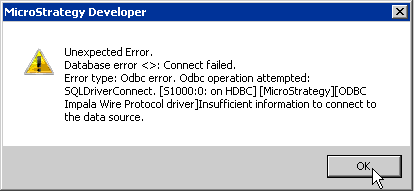
The following error message is received when trying to open the Warehouse Catalog in Strategy Developer 9.4.1 against Impala 1.x data warehouse:
 

ka02R000000kWxXQAU_0EM440000002CHs.png


Unexpected Error. Database error <>: Connect failed. Error type: Odbc error. Odbc operation attempted: SQLDriverConnect.Insufficient information to connect to the data source.
 
CAUSE:
 
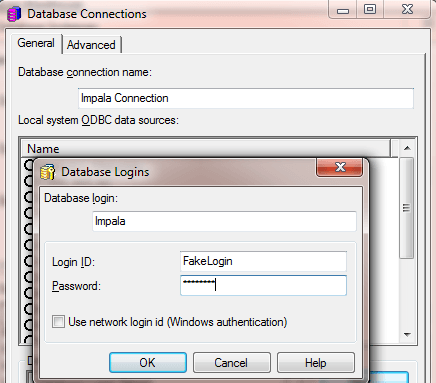
Although there are no credentials needed to access the Impala data warehouse, Strategy requires an username and password to complete the configuration of a database connection in order to access the Warehouse Catalog.
 
ACTION:
 
Modify the database instance being used and enter in any login and password as shown below for the database connection:

ka02R000000kWxXQAU_0EM440000002CI2.png


Comment

0 comments

Details

Knowledge Article

Published:

April 13, 2017

Last Updated:

April 13, 2017