EducationSoftwareStrategy.com
StrategyCommunity

Knowledge Base

Product

Community

Knowledge Base

TopicsBrowse ArticlesDeveloper Zone

Product

Download SoftwareProduct DocumentationSecurity Hub

Education

Tutorial VideosSolution GalleryEducation courses

Community

GuidelinesGrandmastersEvents
x_social-icon_white.svglinkedin_social-icon_white.svg
Strategy logoCommunity

© Strategy Inc. All Rights Reserved.

LegalTerms of UsePrivacy Policy
  1. Home
  2. Topics

KB47784: A URL API hyperlink on an image or text field will not work from DHTML modes for Internet Explorer 8, 9,10 in MicroStrategy Web 9.4.1 HF3


Community Admin

• Strategy


In MicroStrategy Web 9.4.1 HF3, using URL API to run a report or document from an image or text field through the 'Is Hyperlink' function does not work from Interactive and Editable modes in Internet Explorer 8,9, and 10. The link created through the 'Is Hyperlink' feature will take users to the MicroStrategy Homepage or refresh the source document instead of navigating to the correct location.

SYMPTOM:
In Strategy Web 9.4.1 HF3, using URL API to run a report or document from an image or text field through the 'Is Hyperlink' function does not work from Interactive and Editable modes in Internet Explorer 8,9, and 10. The link created through the 'Is Hyperlink' feature will take users to the Strategy Homepage or refresh the source document instead of navigating to the correct location.
STEPS TO REPRODUCE:
In Strategy Tutorial:
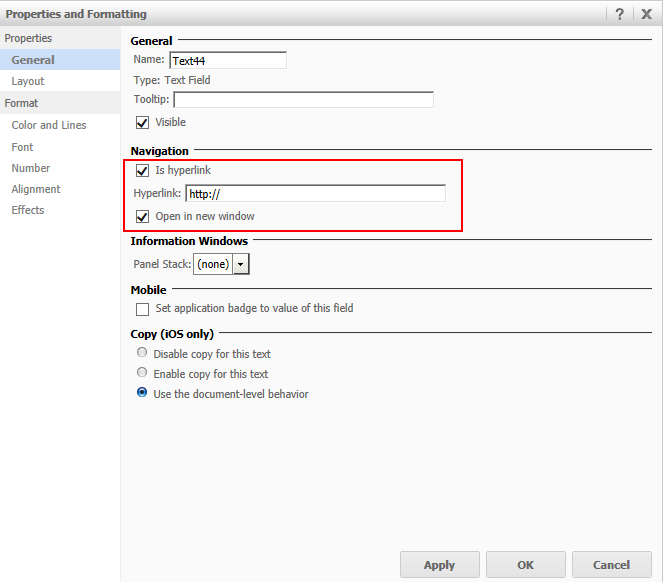
  • Get the URL to run any report or document by right clicking on it > Share > Show Link.
  • Create a blank document.
  • Insert a textbox.
  • Right-click the textbox to open the options.
  • Select Properties and Formatting.
  • Navigate to General > Is Hyperlink, like shown below.
ka04W000000OhQkQAK_0EM440000002642.png
  • Check the 'Is Hyperlink' box.
  • Insert the URL from Step 1.
  • Run the document.
  • Click on the link.

CAUSE:
This is a known issue with the 'Is Hyperlink' function in Strategy Web 9.4.1 HF3.
ACTION:
This issue is fixed in Strategy Web 9.4.1 Hotfix 5. Upgrade to this version to take advantage of this fix.
WORKAROUND:
Run the document from IE 11, Chrome, or Firefox. Or, use the "Navigate to this URL" option in Edit Links when running the document from Internet Explorer 8-10, like shown below.
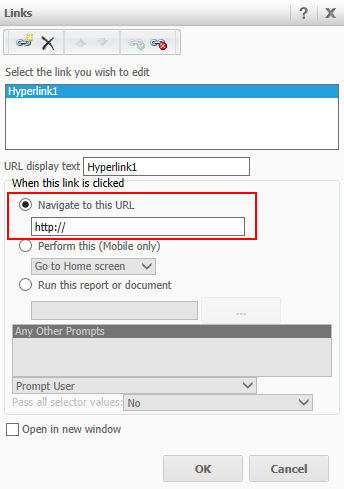
ka04W000000OhQkQAK_0EM44000000263w.png


Comment

0 comments

Details

Knowledge Article

Published:

May 22, 2017

Last Updated:

May 22, 2017