EducationSoftwareStrategy.com
StrategyCommunity

Knowledge Base

Product

Community

Knowledge Base

TopicsBrowse ArticlesDeveloper Zone

Product

Download SoftwareProduct DocumentationSecurity Hub

Education

Tutorial VideosSolution GalleryEducation courses

Community

GuidelinesGrandmastersEvents
x_social-icon_white.svglinkedin_social-icon_white.svg
Strategy logoCommunity

© Strategy Inc. All Rights Reserved.

LegalTerms of UsePrivacy Policy
  1. Home
  2. Topics

KB47804: How to remove the information window close button in a document for MicroStrategy Mobile iOS Client 9.x and 10.x


Community Admin

• Strategy


How to remove the information window close button in a document for MicroStrategy Mobile iOS Client 9.x and 10.x

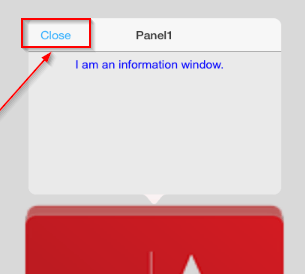
This is how the information window appears with the close button on the Strategy Mobile iOS Client 9.x and 10.x:
ka04W000001MKo0QAG_0EM440000002A4C.png

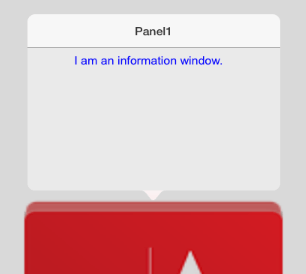
This is how the information window appears without the close button on the Strategy Mobile iOS Client 9.x and 10.x:
ka04W000001MKo0QAG_0EM440000002A4D.png

The following procedure describes how to remove the information window close button for the Strategy Mobile iOS Client 9.x and 10.x:
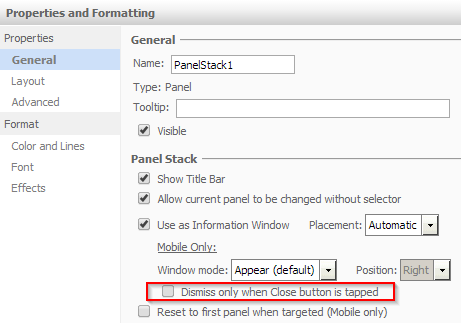
  • Edit the Properties and Formatting of the Panel Stack designated to represent the information window in Strategy Web.
  • Uncheck the checkbox for Dismiss only when Close button is tapped, as seen below:
     
ka04W000001MKo0QAG_0EM440000002A4B.png
  • Save the changes.
  • Refresh the view on the Strategy Mobile iOS Client.

Information on how to create an information window can be found in KB36031: How to associate the information window with an image on iPad in MicroStrategy Mobile before 9.3.1


Comment

0 comments

Details

Knowledge Article

Published:

April 7, 2017

Last Updated:

April 7, 2017