EducationSoftwareStrategy.com
StrategyCommunity

Knowledge Base

Product

Community

Knowledge Base

TopicsBrowse ArticlesDeveloper Zone

Product

Download SoftwareProduct DocumentationSecurity Hub

Education

Tutorial VideosSolution GalleryEducation courses

Community

GuidelinesGrandmastersEvents
x_social-icon_white.svglinkedin_social-icon_white.svg
Strategy logoCommunity

© Strategy Inc. All Rights Reserved.

LegalTerms of UsePrivacy Policy
  1. Home
  2. Topics

KB47836: A user who has the "Configure project basic" privilege cannot rename a project in MicroStrategy Developer 9.x.


Stefan Zepeda

Salesforce Solutions Architect • Strategy


This knowledge base article outlines a privileges issue in MicroStrategy Developer 9.x

SYMPTOM:
A user cannot rename a project in Strategy Developer even though they have the "Configure project basic" privilege
STEPS TO REPRODUCE:
1. In Strategy Developer, create a test user and give the user all privileges except the "Bypass all object security access checks"
 

ka02R000000kX52QAE_0EM440000002CGy.png

 
2. Grant the user full control on the Strategy Tutorial project object
 

ka02R000000kX52QAE_0EM440000002CH3.png

 
3. Log in to Desktop as the test user
4. The user will not be able to rename the Strategy Tutorial project
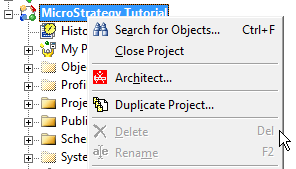
 

ka02R000000kX52QAE_0EM440000002CH0.png

 
CAUSE:
 
This is a known issue in Strategy Developer 9.x. Please contact Strategy Technical Support for an update on this issue.
 
WORKAROUND: 
 
The user can rename the project through Strategy Command Manager using the command below:


ALTER PROJECT "<project_name>" NAME "<new_project_name>";

ka02R000000kX52QAE_0EM440000002CH2.png


Comment

0 comments

Details

Knowledge Article

Published:

April 10, 2017

Last Updated:

April 10, 2017