EducationSoftwareStrategy.com
StrategyCommunity

Knowledge Base

Product

Community

Knowledge Base

TopicsBrowse ArticlesDeveloper Zone

Product

Download SoftwareProduct DocumentationSecurity Hub

Education

Tutorial VideosSolution GalleryEducation courses

Community

GuidelinesGrandmastersEvents
x_social-icon_white.svglinkedin_social-icon_white.svg
Strategy logoCommunity

© Strategy Inc. All Rights Reserved.

LegalTerms of UsePrivacy Policy
  1. Home
  2. Topics

KB47839: Modification of Shape File dropdown is Not Applied to Image Layout Visualization in MicroStrategy Analytics Desktop 9.4.1.6


Community Admin

• Strategy


When users attempt to modify the Shape File for an Image Layout visualization, the Shape File is not applied until the user attempts to modify the Shape File a second time with MicroStrategy Analytics Desktop (MAD) 9.4.1.6.

When users attempt to modify the Shape File for an Image Layout visualization, the Shape File is not applied until the user attempts to modify the Shape File a second time with Strategy Analytics Desktop (MAD) 9.4.1.6.
 
STEPS TO REPRODUCE
  • Launch MAD 9.4.1.6
  • Create a new dashboard using the My Dashboards > Samples > Datasets > Store Details dataset
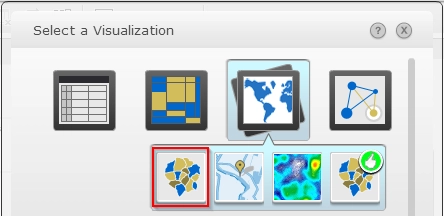
  • Click the icon for Select a Visualization   
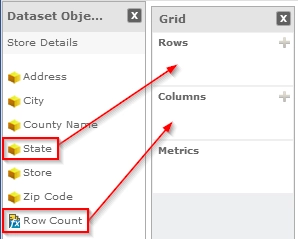
  • Add State to Rows and Row Count to Columns
     
ka04W000000OhlAQAS_0EM4400000025zy.png
  • On the Visualization 1 panel, click the down arrow to get a list of options -- Change Visualization...


  • Choose the Map icon and select the Image Layout option (Note: If this option is not available by default.  To enable this option, follow KB47828: "How to Enable the Image Layout Visualization in MicroStrategy Analytics Desktop 9.4.1.6") 
     
ka04W000000OhlAQAS_0EM4400000025zw.png
  • Go to Show > Properties
  • Change the Shape File drop down to State Markers of USA.  Notice that the Shape File does not change and remains as States of USA


  • Click the Shape File drop down menu to change the layout to State Markers of USA again.  Notice that the image layout will now change to the State markers of USA


CAUSE
This is a known issue with Strategy Analytics Desktop 9.4.1.6.


Comment

0 comments

Details

Knowledge Article

Published:

April 16, 2017

Last Updated:

April 16, 2017