EducationSoftwareStrategy.com
StrategyCommunity

Knowledge Base

Product

Community

Knowledge Base

TopicsBrowse ArticlesDeveloper Zone

Product

Download SoftwareProduct DocumentationSecurity Hub

Education

Tutorial VideosSolution GalleryEducation courses

Community

GuidelinesGrandmastersEvents
x_social-icon_white.svglinkedin_social-icon_white.svg
Strategy logoCommunity

© Strategy Inc. All Rights Reserved.

LegalTerms of UsePrivacy Policy
  1. Home
  2. Topics

KB47866: Same custom number formatting syntax is invalid in MicroStrategy Developer but accepted by MicroStrategy Web in MicroStrategy 9.4.x-10.x.


Stefan Zepeda

Salesforce Solutions Architect • Strategy


This knowledge base article documents a current limitation where the same custom number formatting syntax is invalid in MicroStrategy Developer but accepted by MicroStrategy Web in MicroStrategy 9.4.x-10.x.

SYMPTOM:
When applying 4 qualifications in custom number formatting, the following syntax is invalid in Strategy Developer but is accepted in Web.


[<=(1000000)]("$"0.0,,"M");[<=(1000)]("$"0.0,"K");[>=1000000]"$"0.0,,"M";[>=1000]"$"0.0,"K";0 
STEPS TO REPRODUCE:
The following steps can be performed to reproduce this issue in Strategy Tutorial 9.4.1.

  • In Developer, create a report with 'Call Center' and create a new metric defined as  " - 1,000,000" where 'Revenue' is the existing revenue metric.
ka02R000000kccOQAQ_0EM440000002CHp.png
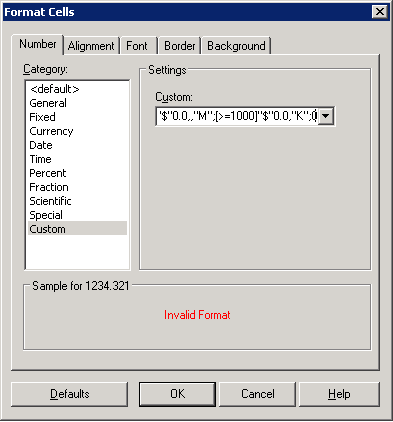
  • Apply custom number formatting to the metric and put in the formula above.  Notice the error below:
ka02R000000kccOQAQ_0EM440000002CHU.png
  • 
    Invalid Format


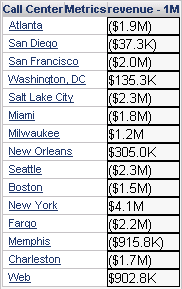
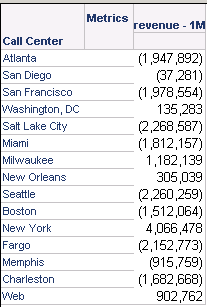
  • Run the same report in Web and apply same custom formatting syntax to the metric and notice that formula is accepted.  However, the formatting doesn't work as expected as the "K" formatting for negative values is not applied.
ka02R000000kccOQAQ_0EM440000002CHJ.png

 
CAUSE:
This is a known limitation in Strategy 9.4.x-10.x.
 
ACTION:
Contact Strategy Technical Support for an update on this issue.
 
WORKAROUND:
Apply custom formatting to the metric for the positive numbers and then use two separate thresholds to apply the custom formatting for negative numbers separately.
 

  • Apply custom formatting to the metric for the positive numbers as follows:


    [>=1000000]"$"0.0,,"M";[>=1000]"$0.0,"K";0 


ka02R000000kccOQAQ_0EM440000002CHc.png
  • Create first threshold to apply custom formatting to negative values less than -1,000,000,


    [<=(1000000)]("$"0.0,,"M")


ka02R000000kccOQAQ_0EM440000002CHf.png


ka02R000000kccOQAQ_0EM440000002CHg.png

​
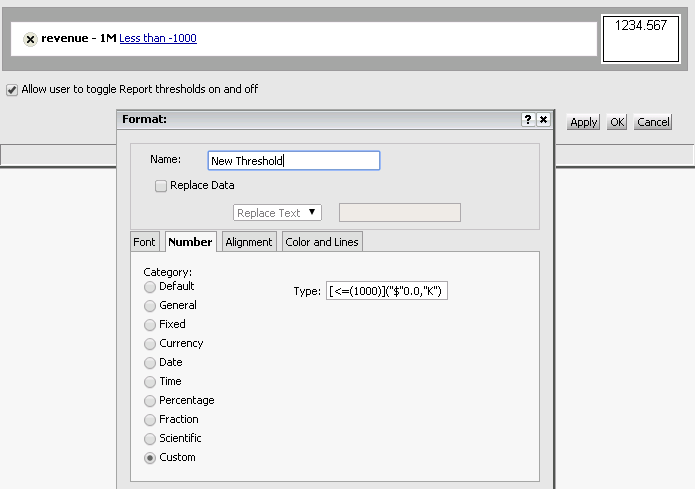
3. Create a second threshold to apply custom formatting to negative values less than -1,000, "[<=(1000)]("$"0.0,"K")"
ka02R000000kccOQAQ_0EM440000002CHd.png
ka02R000000kccOQAQ_0EM440000002CHq.png


Comment

0 comments

Details

Knowledge Article

Published:

April 10, 2017

Last Updated:

April 10, 2017