EducationSoftwareStrategy.com
StrategyCommunity

Knowledge Base

Product

Community

Knowledge Base

TopicsBrowse ArticlesDeveloper Zone

Product

Download SoftwareProduct DocumentationSecurity Hub

Education

Tutorial VideosSolution GalleryEducation courses

Community

GuidelinesGrandmastersEvents
x_social-icon_white.svglinkedin_social-icon_white.svg
Strategy logoCommunity

© Strategy Inc. All Rights Reserved.

LegalTerms of UsePrivacy Policy
  1. Home
  2. Topics

KB47876: When exporting a report to excel from MicroStrategy web, the user gets the error message "User request is queued. Maximum cache memory usage has been reached for existing caches."


Community Admin

• Strategy


SYMPTOM
When exporting a report to Excel from Strategy Web, the message below is shown:
Unable to export User request is queued. Maximum cache memory usage has been reached for existing caches. It could be that the report result is too big. Please try later or contact your Administrator

ka0PW0000000zoHYAQ_0EM440000002613.png

STEPS TO REPRODUCE
1. In Strategy Web, execute a report
2. Select the Home menu and choose "Export  to Excel" either with plain text or with formatting
3. The user will receive the above error message
 
CAUSE
This issue is occurring because the Maximum RAM usage for dataset caches has been exceeded for the Project
 
ACTION
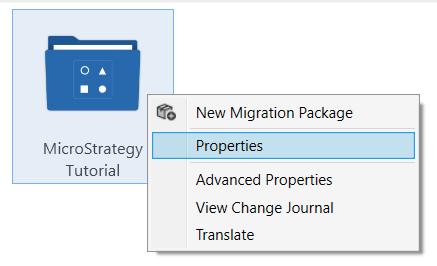
Increase the "Maximum RAM usage for dataset caches" setting for the project using the following steps:
1. In Workstation go to Projects, Right-click the Project and select Properties 

ka0PW0000000zoHYAQ_0EMPW0000046nwb.jpeg
ka0PW0000000zoHYAQ_0EMPW0000046nuz.jpeg

 
2. In the Properties Configuration window, select Caching and Cubes

ka0PW0000000zoHYAQ_0EMPW0000046o4f.jpeg

 
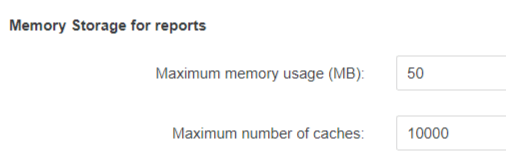
3. Increase the Maximum Memory Usage (MB) setting for Dataset caches to a value larger than the size of the report
ka0PW0000000zoHYAQ_0EMPW0000046oCj.jpeg

Comment

0 comments

Details

Knowledge Article

Published:

March 29, 2017

Last Updated:

February 27, 2024