EducationSoftwareStrategy.com
StrategyCommunity

Knowledge Base

Product

Community

Knowledge Base

TopicsBrowse ArticlesDeveloper Zone

Product

Download SoftwareProduct DocumentationSecurity Hub

Education

Tutorial VideosSolution GalleryEducation courses

Community

GuidelinesGrandmastersEvents
x_social-icon_white.svglinkedin_social-icon_white.svg
Strategy logoCommunity

© Strategy Inc. All Rights Reserved.

LegalTerms of UsePrivacy Policy
  1. Home
  2. Topics

KB47877: Bubble Grids in a Visual Insight Dashboard do not display metric values in the tooltip for the metric in the Color By drop-zone in MicroStrategy Web 9.4.1


Community Admin

• Strategy


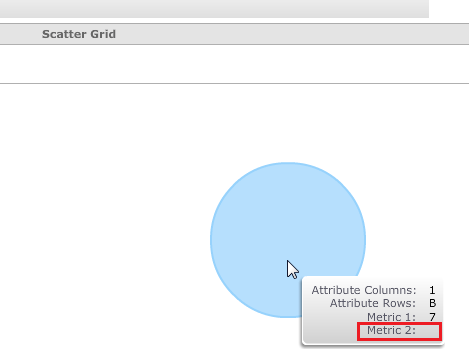
In MicroStrategy Web 9.4.1, a bubble grid in a Visual Insight Dashboard does not display the metric value in the tooltip when the metric that is in the Color by section has the value 0

SYMPTOM: 
In Strategy Web 9.4.1, a bubble grid in a Visual Insight Dashboard does not display the metric value in the tooltip when the metric that is in the Color by section has the value 0, like shown below.
 

ka04W000000OcYKQA0_0EM44000000262M.png


STEPS TO REPRODUCE: 
Follow these steps to reproduce in a Strategy Tutorial project:
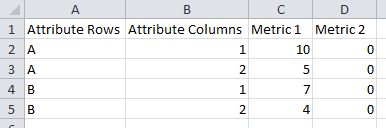
  • Use Data Import to import an Excel file like the one shown below:   
ka04W000000OcYKQA0_0EM44000000262I.png
  • Create a Visual Insight Dashboard with the new imported file.
  • Select the Visualization 'Scatter Grid'.
  • Place the objects as follows: Attribute Columns on Vertical Axis, Attribute Rows on Horizontal Axis, Color By Metric 2, Size By Metric 1.
  • Choose a bubble to mouse over, note that the tooltip does not display the value for metric 2.

 
The issue happens with datasets coming from the Data Warehouse as well.
 
CAUSE:
This is a known issue in Strategy Web 9.4.1.
 
ACTION:
This issue is addressed in Strategy Web 10.0. Upgrade to this or a later version to take advantage of the fix.


Comment

0 comments

Details

Knowledge Article

Published:

May 15, 2017

Last Updated:

May 15, 2017