EducationSoftwareStrategy.com
StrategyCommunity

Knowledge Base

Product

Community

Knowledge Base

TopicsBrowse ArticlesDeveloper Zone

Product

Download SoftwareProduct DocumentationSecurity Hub

Education

Tutorial VideosSolution GalleryEducation courses

Community

GuidelinesGrandmastersEvents
x_social-icon_white.svglinkedin_social-icon_white.svg
Strategy logoCommunity

© Strategy Inc. All Rights Reserved.

LegalTerms of UsePrivacy Policy
  1. Home
  2. Topics

KB47889: How to use table function passing prompt answer as parameter with Freeform SQL reports in MicroStrategy against a DB2 data warehouse


Stefan Zepeda

Salesforce Solutions Architect • Strategy


This article notes a consideration for using DB2 stored procedures for FFSQL reports

According to KB14959, a Freeform SQL report can be used to call the stored procedures in DB2 database and retrieve data. In some cases, it may be desired to invoke a table function instead of stored procedure in the data warehouse.
The following example demonstrate the process of calling a table function "Get_Emps()" in a DB2 database.
 
EXAMPLE:
  1. Create a DB2 version10 database user;
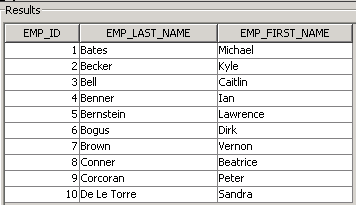
  2. Create a table LU_EMPOLYEE as below:
ka02R000000kbtrQAA_0EM440000002CHa.png


Drop function Get_Emps ();
create function CTC_Get_Emps (IN EmpID INTEGER)
     Returns Table (
                  Emp Numeric,
                  FirstName VARGRAPHIC(50),
                  LastName VARGRAPHIC(50)     
)
Language SQL reads SQL data Return
    (
           Select EMP_ID, EMP_FIRST_NAME, EMP_LAST_NAME from LU_EMPLOYEE
           Where EMP_ID=EmpID
    );
  • Import the table to a project;
  • Run the following SQL using DB Query Tool against the database to create a table function:
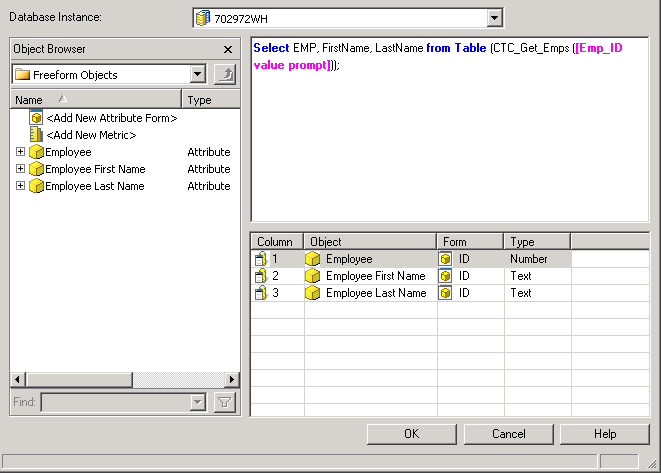
  • Create a Freeform SQL report as below:
ka02R000000kbtrQAA_0EM440000002CHM.png


  • Run the report and if typing in 3 as the prompt answer, the report returns result as below:
ka02R000000kbtrQAA_0EM440000002CHX.png

 
Here is the process: The prompt answer is 3 and passed as parameter to the table function, which returns back a table with all information of employee whose ID is equal to 3. And the FFSQL report retrieves Employee ID, Employee First Name and Employee Last Name from the table, as shown in the image above.
 
Third party code/SQL:
Strategy Technical Support does not provide customized SQL queries. The syntax and the error messages shown in this document can vary depending on the database. Please contact your database administrator to obtain the correct syntax for any desired customized SQL.


Comment

0 comments

Details

Knowledge Article

Published:

June 6, 2017

Last Updated:

June 6, 2017