EducationSoftwareStrategy.com
StrategyCommunity

Knowledge Base

Product

Community

Knowledge Base

TopicsBrowse ArticlesDeveloper Zone

Product

Download SoftwareProduct DocumentationSecurity Hub

Education

Tutorial VideosSolution GalleryEducation courses

Community

GuidelinesGrandmastersEvents
x_social-icon_white.svglinkedin_social-icon_white.svg
Strategy logoCommunity

© Strategy Inc. All Rights Reserved.

LegalTerms of UsePrivacy Policy
  1. Home
  2. Topics

KB47891: How to calculate the active days of an account within a prompted date range if the account has several pay type activities in MicroStrategy Developer 9.4.1


Stefan Zepeda

Salesforce Solutions Architect • Strategy


How to calculate the active days of an account within a prompted date range if the account has several pay type activities in MicroStrategy Developer 9.4.1

The scenario is:  It is required to find out how many days an account is active during the time selected from a date range prompt. To determine when an account is active, there are several different pay type start and end dates to look at. Basically if there is one pay type active on that date then it is count as active date for the account and if none of the pay types is active then it cannot be calculated.
 
EXAMPLE: 

  1. The database should contain a table which stores the Start/End Dates for each pay type for each account. The test uses 3 pay types for simplification purpose. In the screenshot below, Pt1SD and Pt1ED represent the Start and End Dates for PayType 1 resprectively. For PayType 2 and 3, it is in a same manner.
ka02R000000kZgrQAE_0EM440000002CHQ.jpeg


  • Create a Freeform SQL report as below.
    (1) “Account ID prompt” is used to choose an account;
    (2) “StartDate” and “EndDate” prompts are used to choose the report start/end dates;
    (3) three “If” function statements are used to create three flag metrics – “PayType1”, “PayType2” and “PayType3”;
    (4) the last “If” function statement is used to create “Active Date” metric;
ka02R000000kZgrQAE_0EM440000002CHT.jpeg


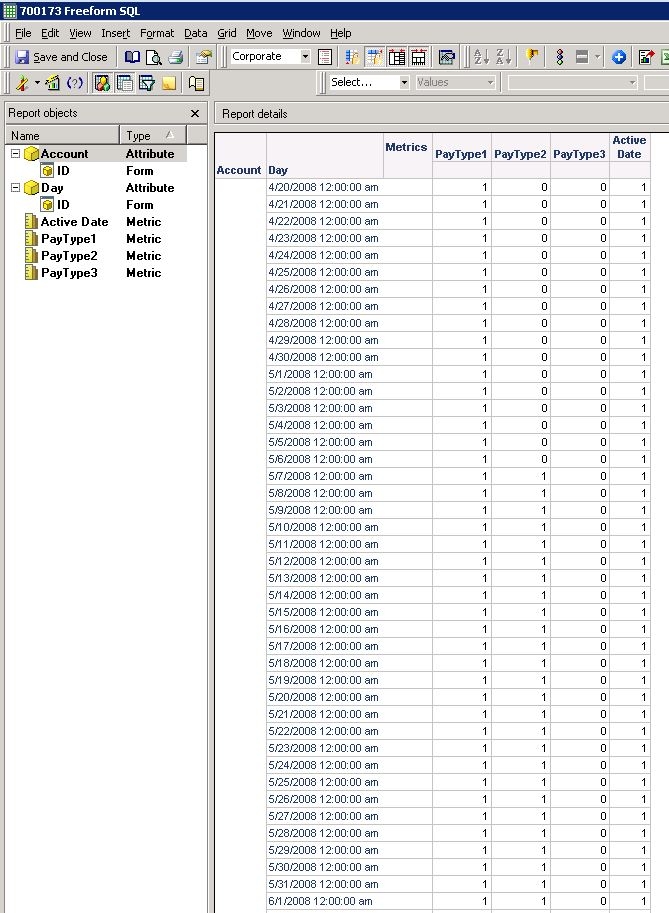
  • Run the report and if choose "5" as Account ID, "1/8/2008" as StartDate and "7/28/2008" as EndDate, it gives result as below:
ka02R000000kZgrQAE_0EM440000002CHK.jpeg
  •  
    For PayType 1, the metric cells from 2/27/2008 to 12/25/2008 are flagged as 1; for PayType 2 and 3, it is the same that only dates between Start and End Dates are flagged as 1. Then the metric Active Date is calculated based on the three metrics and marked as 1 only if the value of one of the metrics is 1 on the same day. "StartDate" and "EndDate" prompts are used to filter out the data that is out of the date range selected.
     
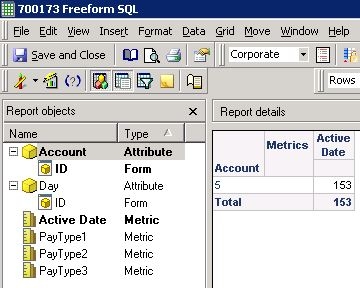
    If only Account and Active Date are put on the template, as shown below, it will be more straightforward to tell how many days the account is active during the selected date range.
     
ka02R000000kZgrQAE_0EM440000002CHO.jpeg

Comment

0 comments

Details

Knowledge Article

Published:

June 8, 2017

Last Updated:

June 8, 2017