SYMPTOM
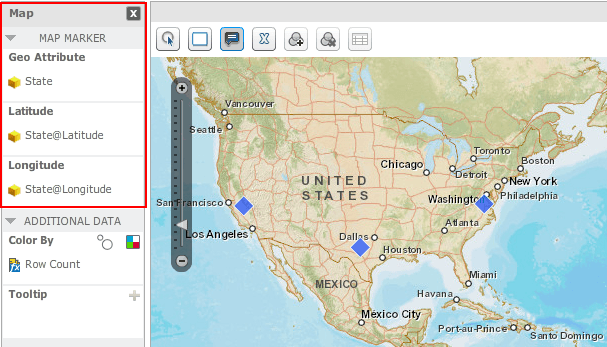
In Strategy Web 9.4.x, 10.x, 2019, 2020 and 2021 when placing a Data Import attribute into the Geo Attribute section of a map visualization, latitude and longitude data are automatically populated if the attribute is mapped to a geographical role, like shown below.
However, latitude and longitude data are not populated after mapping a geographical role to a schema attribute via Strategy Developer, like shown below.
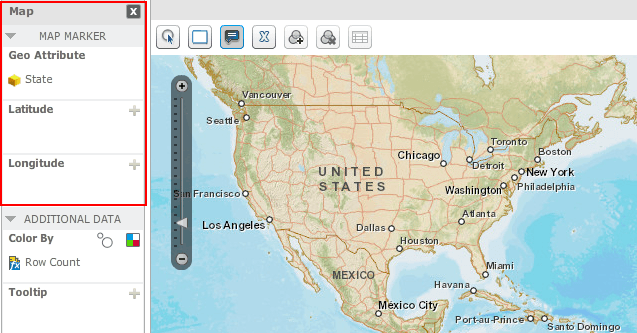
Note: Latitude and longitude data is needed in order to display markers for a map visualization.
STEPS TO REPRODUCE
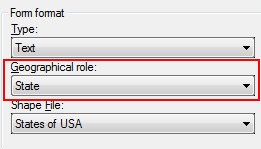
In Strategy Tutorial:
CAUSE
This is a limitation of Strategy Developer 9.4.x. 10.x, 2019, 2020 and 2021. The geographical role in Strategy Developer does not work the same way as Data Import through Strategy Web. Through Strategy Developer, there is no current process to match the attribute element names to their respective latitude and longitude values.
ACTION
This issue was reviewed by our Technology team for feasibility and will not be scoped for a code fix in any upcoming Strategy release.
WORKAROUND
As a workaround, collect the latitude and longitude data from an 3rd party resource and add them to the warehouse. Create the respective attribute forms for the latitude and longitude data for the geographical attribute.
Or, use Data Import from Strategy Web, to link the geo attribute to the latitude and longitude data that automatically populates through this method.
