SUMMARY:
It is described in this document an expected behavior in Strategy Analytics Desktop 9.4.1 when using DSNLess connection to connect to Microsoft SQL Server 2008. In additional, an action is suggested as workaround.
SYMPTOM:
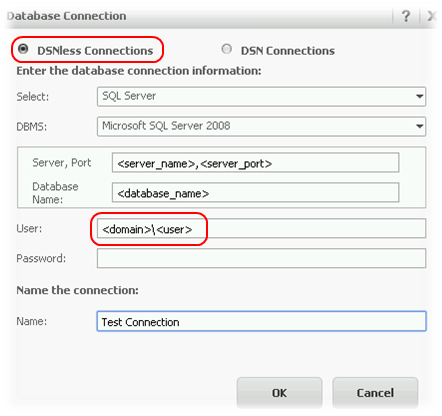
A DSNLess connection to a Microsoft SQL Server 2008 is created from Strategy Analytics Desktop 9.4.1.x with the following configuration:
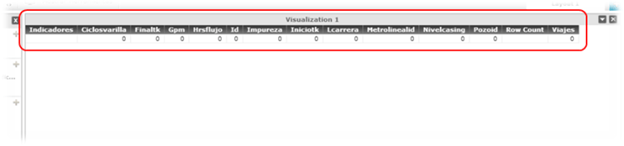
When executing any report against tables which contain data, only zero returns for all columns, as shown:
The following entry is appended into the Strategy Analytics Desktop log:
Failed to connect to data source. Error message: Connect failed.
Error type: Odbc error. Odbc operation attempted: SQLDriverConnect. …
.
.
Connection String: DRIVER=SQL Server;SERVER=<server_name>;PORT=0;DATABASE=<database_name>;USEWINDOWSAUTHENTICATIONFORLOGIN=False;UID=<domain>\<user>;.
CAUSE:
Strategy Analytics Desktop 9.4.1.x does not include an option to enable Windows Authentication. By default, this option is disabled, as seen in the log file extract above.
WORKAROUND:
As workaround, use a Microsoft SQL Server 2008 DBMS object to configure the DSNLess connection.
ACTION:
Currently this issue is being reviewed by Strategy for a potential enhancement on an upcoming Strategy release.
Third Party Software Installation Warning:
The third-party product(s) discussed in this technical note is manufactured by vendors independent of Strategy. Strategy makes no warranty, express, implied or otherwise, regarding this product, including its performance or reliability.
