EducationSoftwareStrategy.com
StrategyCommunity

Knowledge Base

Product

Community

Knowledge Base

TopicsBrowse ArticlesDeveloper Zone

Product

Download SoftwareProduct DocumentationSecurity Hub

Education

Tutorial VideosSolution GalleryEducation courses

Community

GuidelinesGrandmastersEvents
x_social-icon_white.svglinkedin_social-icon_white.svg
Strategy logoCommunity

© Strategy Inc. All Rights Reserved.

LegalTerms of UsePrivacy Policy
  1. Home
  2. Topics

KB47924: The reference line of a bar graph on a microchart widget does not display in MicroStrategy Mobile 9.4.1 iOS update 3.


Community Admin

• Strategy


This document discusses about a known issue that the reference line of a bar graph on a microchart widget does not display in MicroStrategy Mobile.

SYMPTOM:
 
In Strategy Web 9.4.1, users can enable a reference line for a bar graph on a microchart widget, like shown below.
 

ka04W000000OhkjQAC_0EM440000002A3V.png

 
In Strategy Web, the microchart widget will display the reference line values dynamically for each bar graph, like shown below.


ka04W000000OhkjQAC_0EM440000002A3X.jpeg


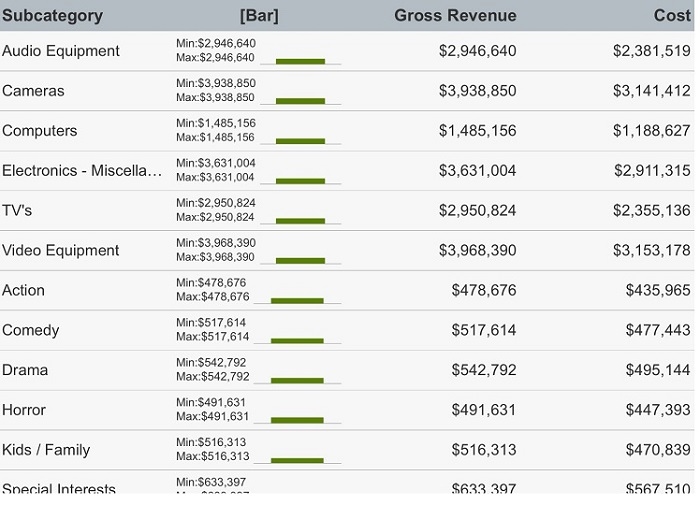
However, in Strategy Mobile 9.4.1 iOS update 3, the reference line does not display, like shown below.
 

ka04W000000OhkjQAC_0EM440000002A3W.jpeg

 
Note: If the microchart widget does not have the Min/Max Legend enabled, the reference line will display in Mobile, however, the values will not display correctly. Refer to technical note KB47921 for information on this issue.
 
STEPS TO REPRODUCE:
 
In Strategy Tutorial:

  1.  Create a report with Category, Subcategory, Profit, Cost, and Gross Revenue.
  2. Create a document using the report as a dataset.
  3. Insert widgets > Mobile > microcharts.
  4. Order the grid as follows: Subcategory, Category, Gross Revenue, Profit, Cost.
  5. Run in Flash mode.
  6. Right-click to select Properties.
  7. Uncheck "show sparkline graph".
  8. Check "show bar graph".
  9. Leave Min/Max Legend checked.
  10. Close out of the Properties.
  11. Run the document in Mobile.
  12. Notice the reference line does not display.

CAUSE:
 
This is a known issue in Strategy Mobile 9.4.1 iOS update 3.
 
ACTION:
 
Contact Strategy Technical Support for an update on this issue.


Comment

0 comments

Details

Knowledge Article

Published:

April 14, 2017

Last Updated:

April 14, 2017