EducationSoftwareStrategy.com
StrategyCommunity

Knowledge Base

Product

Community

Knowledge Base

TopicsBrowse ArticlesDeveloper Zone

Product

Download SoftwareProduct DocumentationSecurity Hub

Education

Tutorial VideosSolution GalleryEducation courses

Community

GuidelinesGrandmastersEvents
x_social-icon_white.svglinkedin_social-icon_white.svg
Strategy logoCommunity

© Strategy Inc. All Rights Reserved.

LegalTerms of UsePrivacy Policy
  1. Home
  2. Topics

KB47953: "Error obtaining a server session (MsiSessionManager failed)" error message appears when upgrading metadata in MicroStrategy Configuration Wizard 9.x


Community Admin

• Strategy


After installing MicroStrategy 9.4.1, the metadata upgrade process fails when attempting to connect with the Administrator user/password. One possible cause is described in this knowledge base article. A solution is provided.

SYMPTOM:
After installing Strategy 9.4.1, the metadata upgrade process fails when attempting to connect with the Administrator user/password.
 

ka04W000000OhbnQAC_0EM4400000029IU.png


Error obtaining a server session (MsiSessionManager: Failed to login User Administrator on the machine server machine: ##.##.##.## Client machine: .)
 
CAUSE:
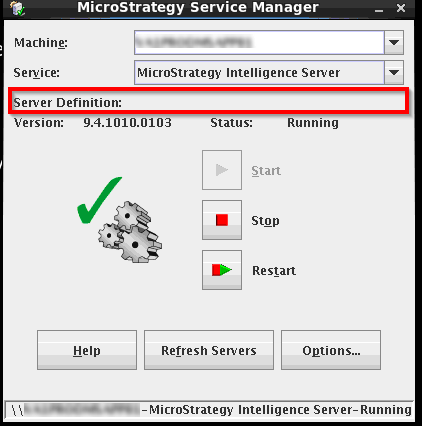
This error is thrown because there is no server definition that can be recognized. This may happen even if the intelligence server configuration was performed successfully. When verified, even if intelligence server is running, there is no server definition assigned to it:

ka04W000000OhbnQAC_0EM4400000029IV.png

 
ACTION:
Re-configure the intelligence server using the Strategy Configuration Wizard to point to a valid server definition. 


Comment

0 comments

Details

Knowledge Article

Published:

May 10, 2017

Last Updated:

May 10, 2017