SYMPTOM:
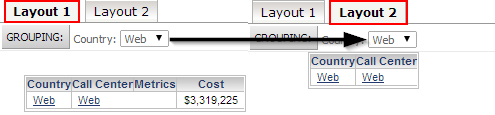
When using a group-by attribute in multiple layouts, a change in Layout 1 will affect the group-by in the other layouts. So, if a group-by dropdown is configured for the Country attribute, changing the group-by in Layout 1 to "Web" will change the group-by in Layout 2 to "Web". This is shown below:
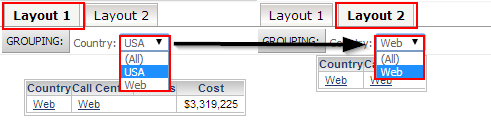
However, If the grid in Layout 2 has a view filter applied to only contain the country "Web", the group-by in Layout 2 will not contain the "USA" element, as shown below:
CAUSE:
This is working as designed in Strategy 9.4.1. Starting in Strategy 9.4.1, view filters on objects in a layout now affect the group-by contents, filtering out those elements from both the object the filter is applied on and the group-by.
WORKAROUND:
There is no way to disable the view filter and group-by interaction, but the view filter condition is only fulfilled if all objects in a layout have the same filter condition. This means that if another grid without a view filter is placed in the same layout, the group-by will display all elements. Below is the setup of the grids in Design Mode:

Shown below is the result of having "USA" selected in the group-by:
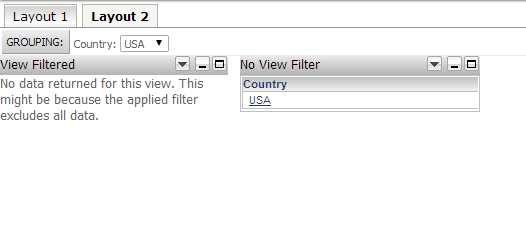
The grid with the view filter displays a "no data returned" message, because it is being filtered by the group-by. The second grid can be hidden to maintain the original look and feel of the dashboard by unchecking the "Visible" property in the Properties and Formatting of the grid, as shown below:

This will ensure that the group-by is properly populated without necessitating a more cluttered dashboard.
