EducationSoftwareStrategy.com
StrategyCommunity

Knowledge Base

Product

Community

Knowledge Base

TopicsBrowse ArticlesDeveloper Zone

Product

Download SoftwareProduct DocumentationSecurity Hub

Education

Tutorial VideosSolution GalleryEducation courses

Community

GuidelinesGrandmastersEvents
x_social-icon_white.svglinkedin_social-icon_white.svg
Strategy logoCommunity

© Strategy Inc. All Rights Reserved.

LegalTerms of UsePrivacy Policy
  1. Home
  2. Topics

KB47984: A selector does not update the data on the calendar widget in MicroStrategy Mobile for iPad 9.4.1 update 3


Community Admin

• Strategy


This document discusses about a known issue that a selector does not update the data on the calendar widget in MicroStrategy Mobile for iPad.

SYMPTOM:
In Strategy Mobile for iPad 9.4.1 update 3, changing a date using a selector will not update the data displayed on the calendar widget (also referred to as the date selection widget).The document will display the "Running" page for a few seconds, like shown below.
 

ka04W000000OhleQAC_0EM440000002A3n.png


However, the calendar will still display the current date instead of the selection, like shown below.
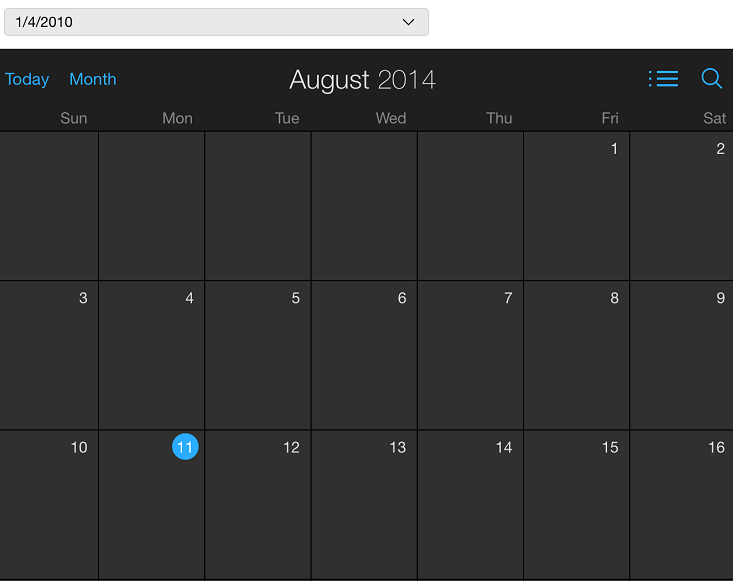
ka04W000000OhleQAC_0EM440000002A3p.png


STEPS TO REPRODUCE:
In Strategy Tutorial:
  • Create a report with Day, Category, Subcategory, and Revenue.
  • Create a document using the report as a dataset.
  • Insert > widgets > mobile > Date Selection.
  • Insert a selector targeting the widget.
  • Place the Date attribute in the selector.
  • Run the document in Strategy Mobile for iPad.
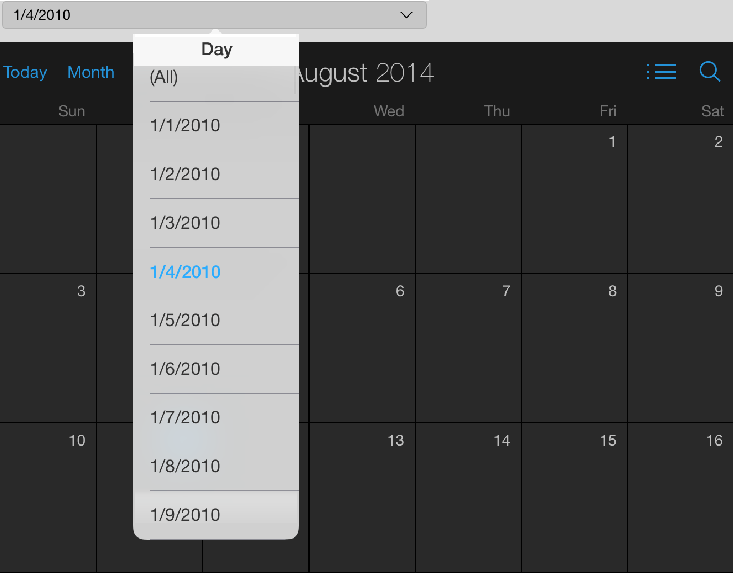
  • Select any date on the selector, like shown below.
ka04W000000OhleQAC_0EM440000002A3c.png
  • Notice the calendar does not update to the selected date. 

CAUSE:
This is a known issue in Strategy Mobile for iPad 9.4.1 update 3.
 
ACTION:
Contact Strategy Technical Support for an update on this issue.
 
WORKAROUND:
 Before making a selection, first set the calendar to display a date that has data. Now the selector should work as expected.


Comment

0 comments

Details

Knowledge Article

Published:

April 14, 2017

Last Updated:

April 14, 2017