EducationSoftwareStrategy.com
StrategyCommunity

Knowledge Base

Product

Community

Knowledge Base

TopicsBrowse ArticlesDeveloper Zone

Product

Download SoftwareProduct DocumentationSecurity Hub

Education

Tutorial VideosSolution GalleryEducation courses

Community

GuidelinesGrandmastersEvents
x_social-icon_white.svglinkedin_social-icon_white.svg
Strategy logoCommunity

© Strategy Inc. All Rights Reserved.

LegalTerms of UsePrivacy Policy
  1. Home
  2. Topics

KB47989: The average of the metric value is not displayed correctly at day of week level.


Stefan Zepeda

Salesforce Solutions Architect • Strategy


The average of the metric value is not displayed correctly at day of week level.

SYMPTOM:
 
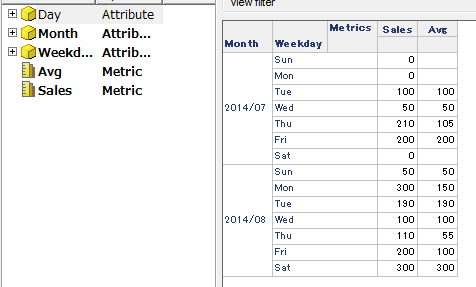
In Strategy Developer 9.x, the average of the metric value is not displayed correctly at the day of week level, as shown in the image below:
 

ka02R000000kcboQAA_0EM440000002CHF.png

 
The report shows data from 16th July to 15th August.
For instance, the number for Sundays in August is 2. It should be displayed as 50/2 = 25.
 
STEPS TO REPRODUCE:
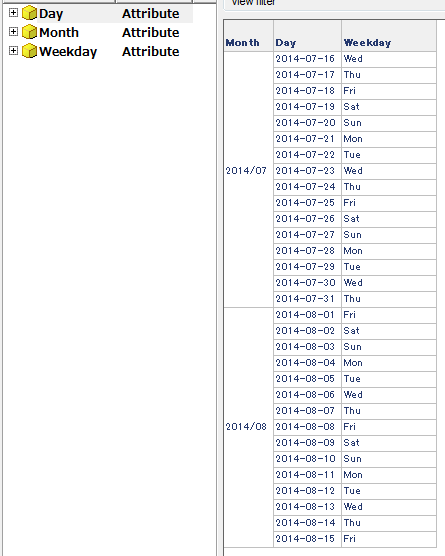
  • Apply the filter from 16th July to 15th August. The days on the lookup table are displayed correctly.
ka02R000000kcboQAA_0EM440000002CHD.png
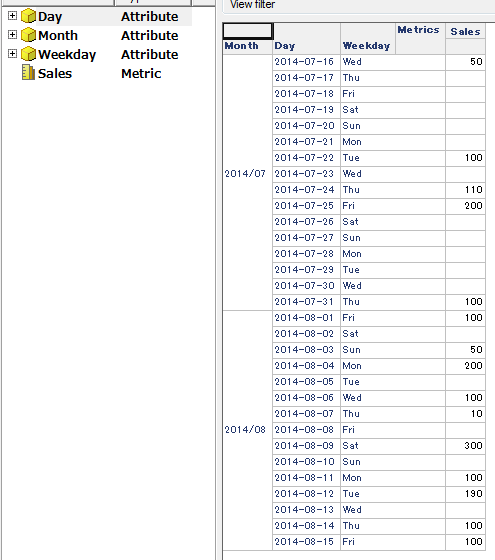
  • Add the ‘Sales’ metric to the report and set the “Preserve all lookup table VLDB proeprty” to the 4th option. The report is displayed as shown in the image below:
ka02R000000kcboQAA_0EM440000002CHH.png
  • Add ‘Avg’ metric  (Avg(Sales) {~, Weekday}). Note that the metric value shows incorrect values. 

CAUSE:
 
This is by design. The average metric shows the value divided by the number of the entries in the fact table at day of week level.
 
ACTION:
 
Create a metric which divides the value by the number of week days, as shown below:
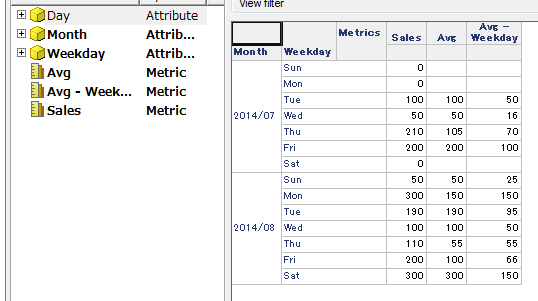
ka02R000000kcboQAA_0EM440000002CHB.png

 
Avg - Weekday:


(Sum(Sales) {~, Weekday}  / Count(Day) {~, Weekday} )


Comment

0 comments

Details

Knowledge Article

Published:

April 11, 2017

Last Updated:

April 11, 2017