EducationSoftwareStrategy.com
StrategyCommunity

Knowledge Base

Product

Community

Knowledge Base

TopicsBrowse ArticlesDeveloper Zone

Product

Download SoftwareProduct DocumentationSecurity Hub

Education

Tutorial VideosSolution GalleryEducation courses

Community

GuidelinesGrandmastersEvents
x_social-icon_white.svglinkedin_social-icon_white.svg
Strategy logoCommunity

© Strategy Inc. All Rights Reserved.

LegalTerms of UsePrivacy Policy
  1. Home
  2. Topics

KB48000: The temp files cannot be deleted automatically after refreshing the documents in Microsoft 2010 PowerPoint against MicroStrategy Office 9.x


Community Admin

• Strategy


The temp files cannot be deleted automatically after refreshing the documents in Microsoft 2010 PowerPoint against MicroStrategy Office 9.x

SYMPTOM:
The temp files cannot be deleted automatically after refreshing the report services documents in Microsoft 2010 PowerPoint against Strategy Office 9.x. Consequently, data will be rendered automatically in Microsoft Excel as well after refreshing, even though Excel is not opened.
 
STEPS TO REPRODUCE:
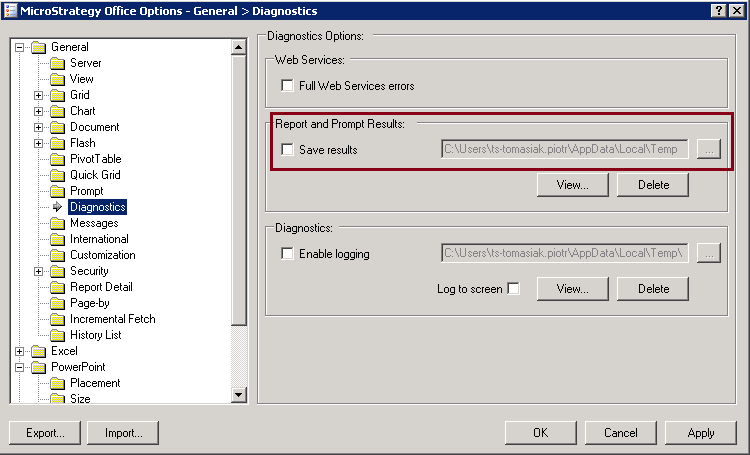
  • Navigate to "Strategy Office Options -> General -> Diagnostics" and disable the "Save result" option.

ka04W000000OehvQAC_0EM44000000261f.png
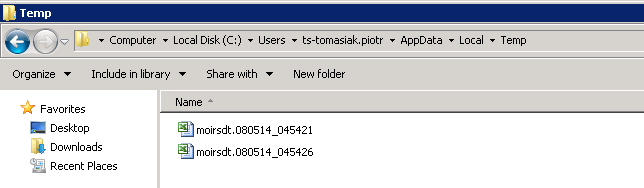
  • Open the downloaded report services documents in Microsoft 2010 PowerPoint and refresh the data.
  • Check the temp folder and temp files are still there.  

ka04W000000OehvQAC_0EM44000000261Y.png

CAUSE:
This is a known issue of Strategy Office 9.x.
 
ACTION:
This issue is fixed in Strategy 9.5.1.Please upgrade to take advantage of the fix.
 
WORKAROUND:
 
Users can refer to the following documentation provided by Microsoft to prevent files from opening automatically in Excel.
http://support.microsoft.com/kb/826922


Comment

0 comments

Details

Knowledge Article

Published:

June 7, 2017

Last Updated:

June 7, 2017