EducationSoftwareStrategy.com
StrategyCommunity

Knowledge Base

Product

Community

Knowledge Base

TopicsBrowse ArticlesDeveloper Zone

Product

Download SoftwareProduct DocumentationSecurity Hub

Education

Tutorial VideosSolution GalleryEducation courses

Community

GuidelinesGrandmastersEvents
x_social-icon_white.svglinkedin_social-icon_white.svg
Strategy logoCommunity

© Strategy Inc. All Rights Reserved.

LegalTerms of UsePrivacy Policy
  1. Home
  2. Topics

KB48005: How to disable Move left, Move Right, Move to Row/Column option in the grid on the MicroStrategy 9.x or 10.x Web but still keep the sorting functionality.


Community Admin

• Strategy


Article outlines how to disable the options to pivot in a grid in MicroStrategy Web 9.x or 10.x

SYMPTOM:
In some cases, users want to disable Move left, Move Right, Move to Row/Column option in the grid but still keep the sorting option.
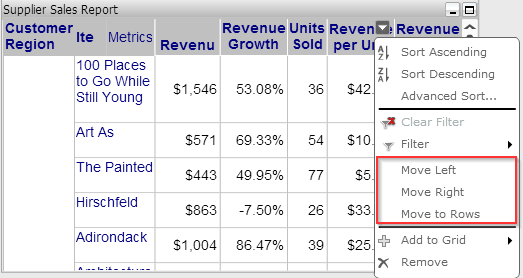
ka04W000001MKjjQAG_0EM440000002HHA.png

ACTION:
In order to disable Move left, Move Right, Move to Row/Column option, disable the 'web pivot report' privilege under "Web Analyst" for the user or the group that user belong.
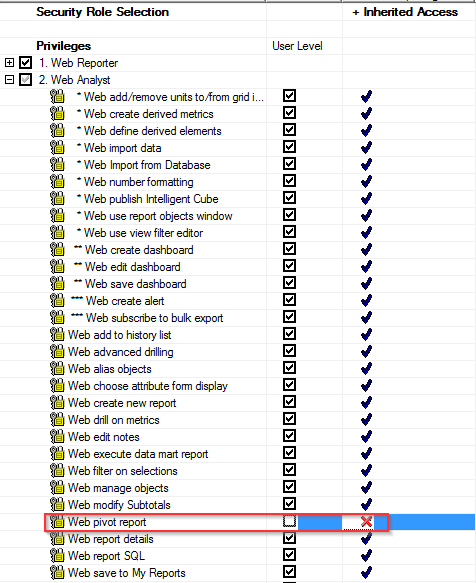
ka04W000001MKjjQAG_0EM440000002HH9.png


Comment

0 comments

Details

Knowledge Article

Published:

April 11, 2017

Last Updated:

April 11, 2017