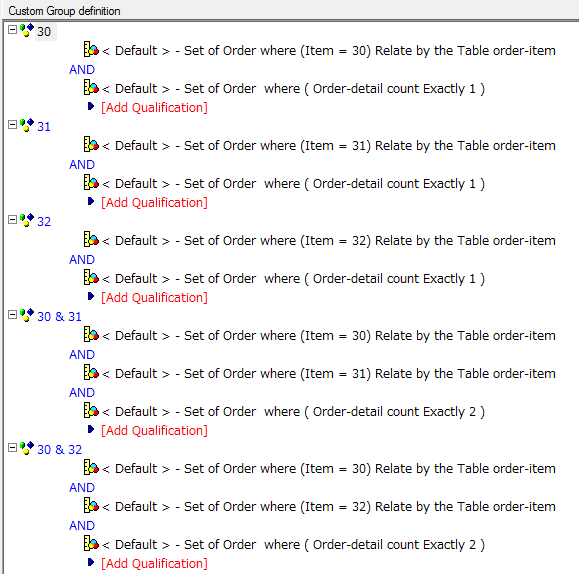
The following report shows the elements with the set of Item ID(s) grouped by Order ID, and count the number of Order ID per each element. This is valid when the sets of Items logged to the table are fixed.
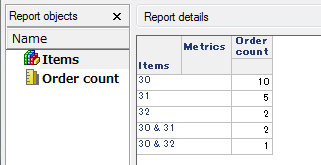
For instance, 2 Items, Item ID (30) and Item ID (31) are ordered with Order ID (137677) in the following fact table.
Order ID (1377044) has the same set of Items, so the metric count 2 for the set of Item ID (30 and 31).
Database table: order-item
Order ID | Order Date | Order-detail ID | Item ID |
137632 | 20140101 | 1 | 30 |
137633 | 20140101 | 1 | 31 |
137634 | 20140101 | 1 | 30 |
137635 | 20140101 | 1 | 30 |
137636 | 20140101 | 1 | 30 |
137654 | 20140102 | 1 | 30 |
137655 | 20140102 | 1 | 30 |
137656 | 20140102 | 1 | 30 |
137657 | 20140102 | 1 | 32 |
137658 | 20140102 | 1 | 32 |
137659 | 20140102 | 1 | 31 |
137660 | 20140102 | 1 | 30 |
137662 | 20140102 | 1 | 31 |
137663 | 20140102 | 1 | 31 |
137664 | 20140102 | 1 | 31 |
137665 | 20140102 | 1 | 30 |
137666 | 20140102 | 1 | 30 |
137677 | 20140103 | 1 | 31 |
137677 | 20140103 | 2 | 30 |
137704 | 20140104 | 1 | 31 |
137704 | 20140104 | 2 | 30 |
137706 | 20140104 | 1 | 30 |
137706 | 20140104 | 2 | 32 |
The following steps show how to create the report.