EducationSoftwareStrategy.com
StrategyCommunity

Knowledge Base

Product

Community

Knowledge Base

TopicsBrowse ArticlesDeveloper Zone

Product

Download SoftwareProduct DocumentationSecurity Hub

Education

Tutorial VideosSolution GalleryEducation courses

Community

GuidelinesGrandmastersEvents
x_social-icon_white.svglinkedin_social-icon_white.svg
Strategy logoCommunity

© Strategy Inc. All Rights Reserved.

LegalTerms of UsePrivacy Policy
  1. Home
  2. Topics

KB48029: "The report returns no data. Please check the report and/or the view filter definition" error message is encountered when executing the "52.7 User Properties" out-of-the-box Enterprise Manager report


Community Admin

• Strategy


"The report returns no data. Please check the report and/or the view filter definition" error message is encountered when executing the "52.7 User Properties" out-of-the-box Enterprise Manager report in MicroStrategy 9.x

SYMPTOM:
 
When executing the out-of-the-box Enterprise Manager report "52.7 User Properties", the execution completes but no data is returned (as shown below) even though the execution should result in a list of all users in monitored projects.
 

ka04W000000Oe35QAC_0EM4400000029MN.png

 
CAUSE:
 
In the configuration of the Enterprise Manager 9.x project schema, the filter "All Intelligence Servers" is included with this and other reports which prevents the reports from returning any data.
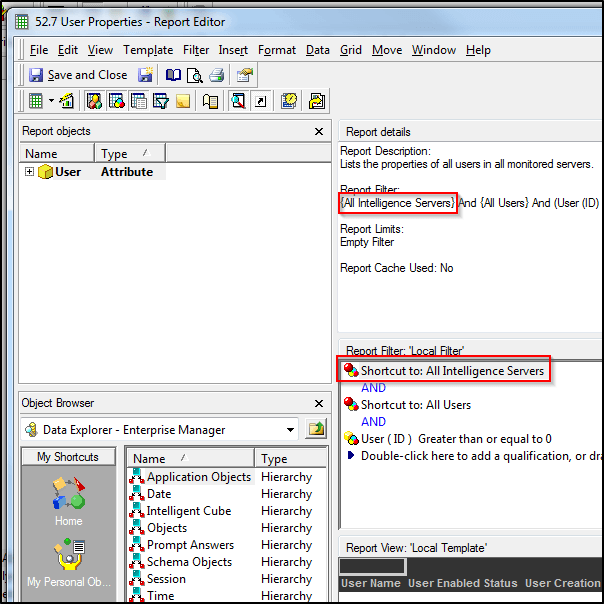
 

ka04W000000Oe35QAC_0EM4400000029MZ.png

 
ACTION:
 
Removing the "All Intelligence Servers" filter will allow the report to execute normally.
 

ka04W000000Oe35QAC_0EM4400000029MP.png


Comment

0 comments

Details

Knowledge Article

Published:

April 1, 2017

Last Updated:

April 1, 2017