EducationSoftwareStrategy.com
StrategyCommunity

Knowledge Base

Product

Community

Knowledge Base

TopicsBrowse ArticlesDeveloper Zone

Product

Download SoftwareProduct DocumentationSecurity Hub

Education

Tutorial VideosSolution GalleryEducation courses

Community

GuidelinesGrandmastersEvents
x_social-icon_white.svglinkedin_social-icon_white.svg
Strategy logoCommunity

© Strategy Inc. All Rights Reserved.

LegalTerms of UsePrivacy Policy
  1. Home
  2. Topics

KB48051: Users can still see white spaces after setting the background to another one for a report services document in MicroStrategy Web 9.4.1


Community Admin

• Strategy


Users can still see white spaces after setting the background to another one for a report services document in MicroStrategy Web 9.4.1

SYMPTOM:
Users can still see white spaces after setting the background to another one, for instance Grey, for a report services document in Strategy Web 9.4.1
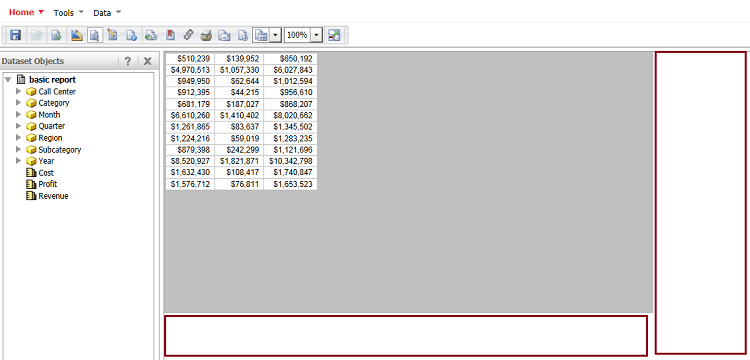


ka04W000000OdveQAC_0EM44000000260T.png

 
CAUSE:
This is working as designed.
 
WORKAROUND:
Users can choose either of the following two ways to make the background fit 100% of the screen width:
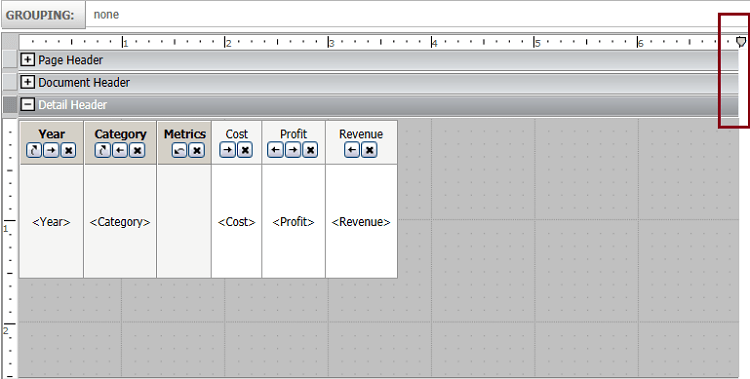
  • In the Editable mode, users can drag the following highlighted line to change the page width manually and make it fit 100% of the screen width. To choose this solution, users need to make sure that the report services document will be run on computers/devices with the same screen resolution.
     
ka04W000000OdveQAC_0EM44000000260V.png
  • Choose "Fit Width" and save the report services document.
     
ka04W000000OdveQAC_0EM44000000260R.png


Comment

0 comments

Details

Knowledge Article

Published:

June 15, 2017

Last Updated:

June 15, 2017