EducationSoftwareStrategy.com
StrategyCommunity

Knowledge Base

Product

Community

Knowledge Base

TopicsBrowse ArticlesDeveloper Zone

Product

Download SoftwareProduct DocumentationSecurity Hub

Education

Tutorial VideosSolution GalleryEducation courses

Community

GuidelinesGrandmastersEvents
x_social-icon_white.svglinkedin_social-icon_white.svg
Strategy logoCommunity

© Strategy Inc. All Rights Reserved.

LegalTerms of UsePrivacy Policy
  1. Home
  2. Topics

KB48054: "Auto fit to contents" setting is not retained when the report is exported to xlsx format for excel version as 2007 or higher in MicroStrategy Web


Community Admin

• Strategy


Auto fit to contents" setting is not retained when the report is exported to xlsx format for excel version as 2007 or higher in MicroStrategy Web.

SYMPTOM:
 
"Auto fit to contents" setting is not retained when the report is exported to xlsx format for excel version as 2007 or higher in Strategy Web as below:
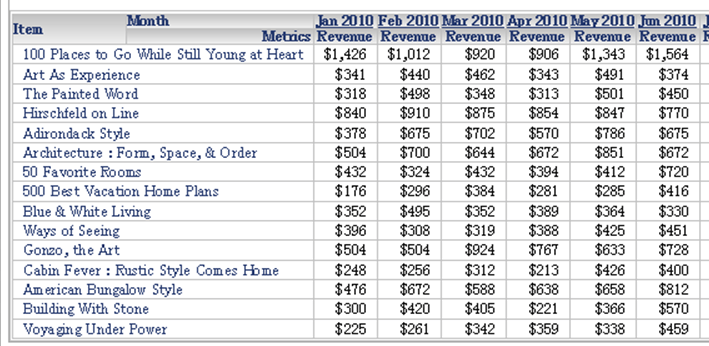
In Web, "Auto fit to contents" works correctly for Item:
ka04W000000OdawQAC_0EM44000000260d.png

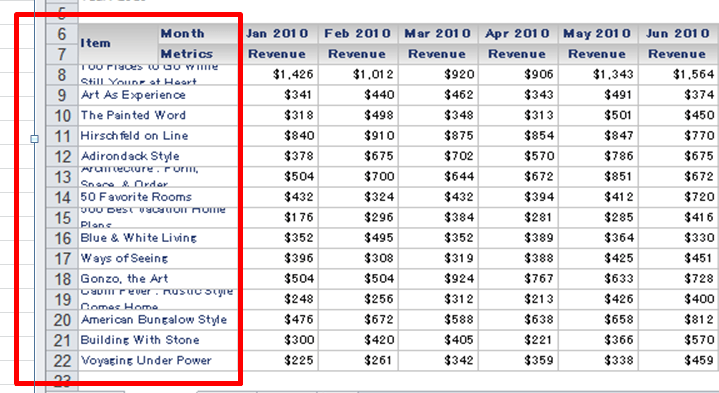
But it is not retained when exported to xlsx:
ka04W000000OdawQAC_0EM44000000260b.png


CAUSE:
This is a known limitation specific to Microsoft Excel export with version 2007 or higher which does not allow column width calculation in advance.  
ACTION:
Change the excel version to "xp\2003" in Web preference so that the report will be exported to xls format.  


Comment

0 comments

Details

Knowledge Article

Published:

April 13, 2017

Last Updated:

April 13, 2017