Starting with the release of Strategy ONE (March 2024), dossiers are also known as dashboards.
Executing a report based off the project schema or publishing any of the out-of-the-box super cubes in the Platform Analytics Project results in an error "Access denied for user 'xxx'@'xxx'(using password:YES)".
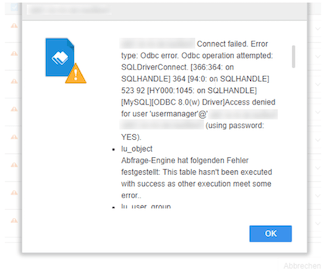
The same error messages can be found in the dserrorlog:
Error type: Odbc error. Odbc operation attempted: SQLDriverConnect. [366:364: on SQLHANDLE] 364 [94:0: on SQLHANDLE] 523 92 [HY000:1045: on SQLHANDLE] [MySQL][ODBC 8.0(w) Driver]Access denied for user 'usermanager'@'mstr' (using password: YES) Connection String: DSN=platform_analytics;UID=usermanager;.
2018-12-05 18:04:47.994+01:00 [HOST:mstr][SERVER:CastorServer][Database Classes][Error][UID:5C0F1D2F4C99375EEFDA3DB48CBAE6A9][SID:507EAFAFB06D777D28F2A91EC5AFB332][OID:7C5CD53E11E529671FB700802FF7BD86] Failed to connect to data source. Error message: Connect failed.
This can be caused by multiple issues. Use the steps below to resolve each case.
1. The Database Instance, Database Connection or Database Login are Incorrect
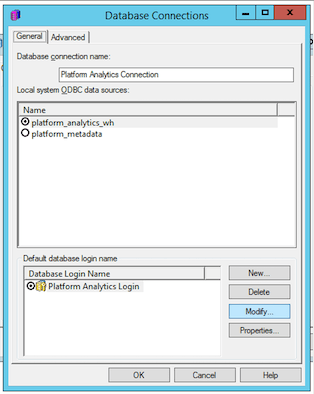
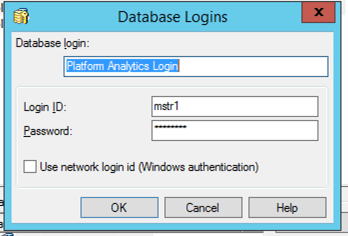
When creating the Platform Analytics project, Configuration Wizard will import a configuration package into the metadata which contains the DB Instance, DB Connection and DB Login objects. However, if the database configuration changes thereafter, the configuration objects may need to be updated. To update,
2. Warehouse Pass-Through is Enabled for the Project
By default, when a new project is created in Strategy, warehouse pass-through will be enabled. However, if the Strategy metadata user does not have access to the Platform Analytics Repository, they will be unable to execute reports, dossiers, cube, etc. The metadata user level WH Passthrough takes precedence over the configured Database Instance and Connection Mapping for the project. To solve this issue,
A defect has been logged to disabled WH Pass-though authentication for the Platform Analytics projects in future releases when Configure the Platform Analytics Project .
Read this article on Platform Analytics Best Practices and Troubleshooting. Watch this video on Configuring Platform Analytics.
KB482888
